
Manage Global Settings
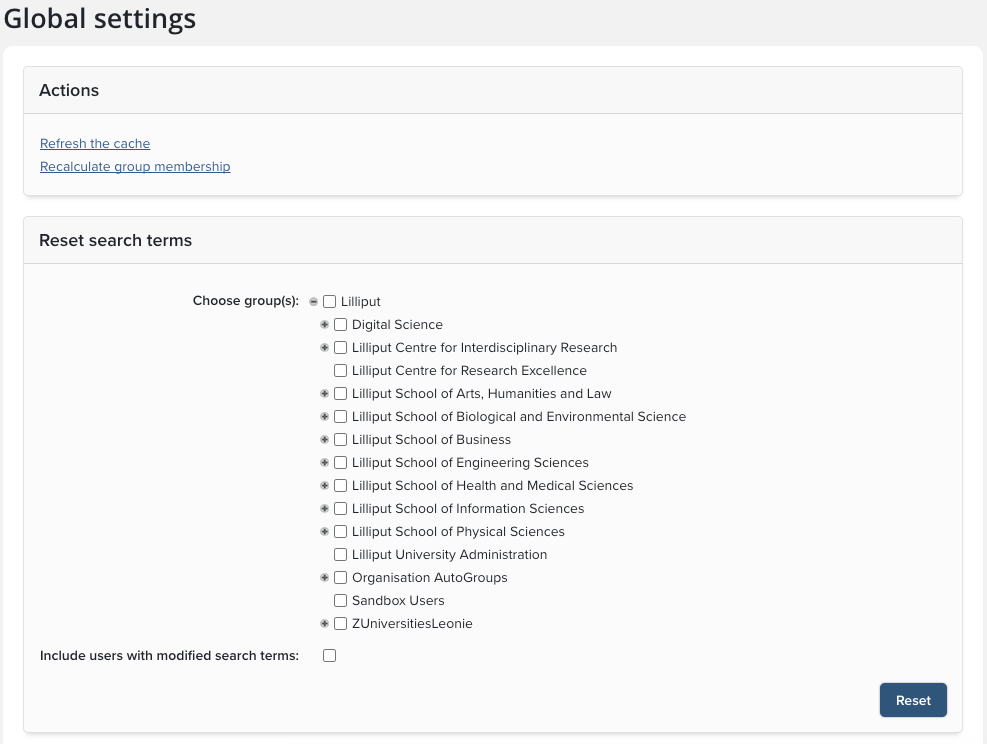
The Global settings page System admin > General settings > Global settings contains system-specific configuration options and system-wide actions.
Actions
Refresh the cache
Forces an immediate refresh of Elements' cache.
Recalculate group membership
Forces an immediate recalculation of group membership. You may wish to use this after changes to group structure or your HR data.
Reset search terms
This section allows you to reset users' publication search terms to their defaults. These defaults are specified in the System admin > Data sources > Default search settings page or, if the "Override" setting on that page is disabled, on the equivalent page for the users' Primary Group(s).
Use this operation with caution. Incorrect or badly chosen search terms can have adverse effects on search results. In addition, forcibly resetting search terms may create a negative reaction amongst your users if the transition is not handled well. Be sure that you wish to carry out this operation before proceeding.
Select Groups: select the groups you wish to be affected by this operation.
Include users with modified search terms: If you leave this box unchecked, users who have explicity modified their search settings will be excluded from the operation (i.e. their current search settings will be respected and will not be overwritten). If you check this box, all users in the selected groups will be included in the operation, regardless of their personal search settings.
Click 'Reset'
Update global settings
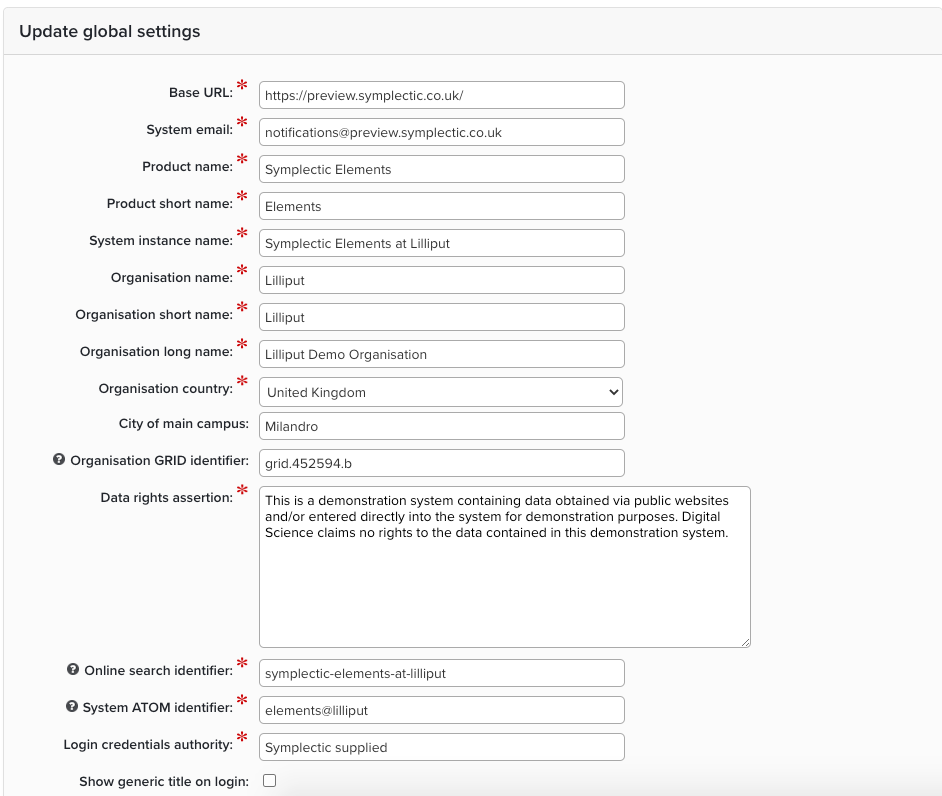
This section allows you to set system information specific to the Elements instance:
Setting | Description |
|---|---|
Base URL | This is the base URL for the website, and is used for API output, absolute URLs and licensing. |
System email | This appears in the 'from' field for any emails that the system sends. Use an appropriate real email address. |
Product name | This is the name of the product; however the client wishes to refer to Elements. |
Product short name | This is displayed in places where the full product name might be too long. |
System instance name | This is the name of the current instance, used for API output and to refer to the specific instance. |
Organisation name | This is the name of the client; however the client wishes to refer to themselves. |
Organisation short name | This is displayed in places where the full organisation name might be too long. |
Organisation long name | This is used to refer to the client in the context of licensing. |
Organisation country | This allows you to specify your home country. |
City of main campus | Use this to specify your organisation's primary location if you have multiple campuses. |
Organisation GRID identifier | Organisation unique ID in GRID. This is used when sending affiliation information using the ORCID write integration. |
Data rights assertion | This is a statement to warn against misuse of the data, such as using it without permission. |
Online search identifier | This is used to identify the instance to external data sources, and must begin with a letter, end with a letter or number, and contain only lowercase letters, numbers and hyphens. |
System ATOM identifier | This is used to identify the instance in ATOM feeds, and must contain exactly one '@' character, at neither the end nor the beginning, and can contain only the '@' character, hyphens and lowercase letters. |
Login credentials authority | This forms part of the message on the login page which asks for credentials. |
Show generic title on login | If this is not checked then '[Product name] Login' will be displayed on the login page, otherwise it will display "Welcome to Symplectic". |
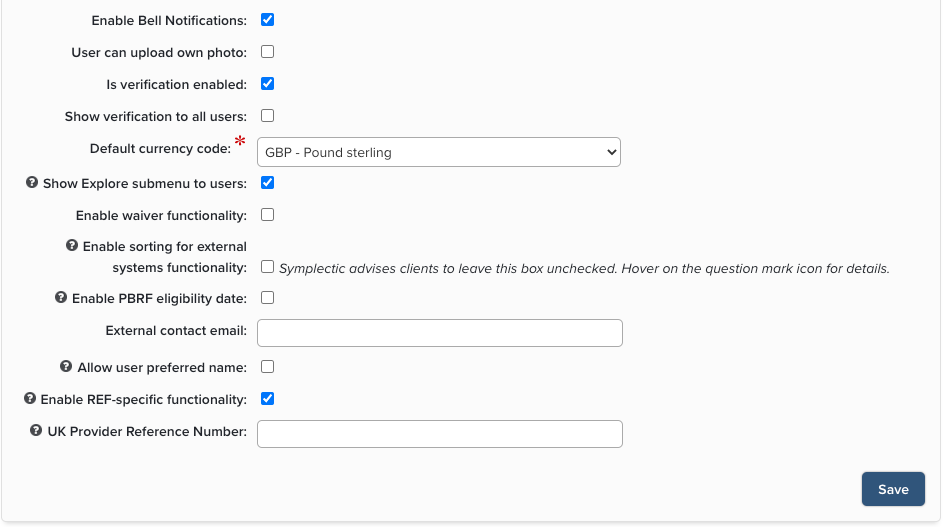
Enable Bell Notifications | In V6.x: This is used to determine whether the messaging framework (inbox and associated notifications) is enabled or not. |
User can upload own photo | This is used to determine whether users can upload their own photo on the My Profile page or not. |
Is verification enabled | This is checked to enable verification functionality to be used. The verification allows for a bibliographic checking role to be used. N.B. As of version 6.16 of Elements, this configuration has been moved to the 'Settings' page for each Category (For example, Category Admin > Publications > Publication Settings. |
Show verification to all users | This is check to allow end users to have visibility of verification status. N.B. As of version 6.16 of Elements, this configuration has been moved to the 'Settings' page for each Category (For example, Category Admin > Publications > Publication Settings. |
Default currency code | This is to allow you to select the currency of your country. The default currency is suggested to users when editing money data in an entry form. |
Show Explore submenu to users | This allows you to limit the ability to search Elements for content. Used if you have private and/or confidential content. |
Waiver functionality | This allows you to include the ability to assign a waiver for full-text content. |
Enable sorting for external systems functionality | This enables the 'Update Sort for External Systems' section on the Account Settings page for each user. This been made optional, and Symplectic advises against using this functionality. |
Enable PBRF eligibility date | Intended for New Zealand customers only. If enabled, a PBRF eligibility date will be calculated for all publications, displayed on the publications details page, and made available for use in PBRF portfolios completed using the Assessment Module. |
External contact email | Add an email address for an external contact. |
Allow user preferred name | If enabled, each user will be able to set their first name and / or last name to display throughout Elements. This will not override names from your HR feed in the system, but will update the display names for the users within the website. If switched off, system administrators are still able to manage this setting for users. |
Enable REF-specific functionality | Intended for UK customers only. If enabled, certain aspects of Elements geared towards facilitating a REF submission will be available. |
UK Provider Reference Number | Intended for UK customers only. This value is required to produce a valid XML submission file for submission to the REF system. |