
Symplectic Elements v6.18 - Release Notes
Symplectic Elements Release Notes April 2024 v6.18
Introduction
Welcome to release v6.18!
This release focuses on three of our key themes for the year - streamlining researcher experiences, showcasing engaging content, and enhancing administrative workflows. Notable enhancements in this release include:
An expansion and enrichment of the Projects category.
Discovery module enhancements including an improved search experience and greater ability to control content to be synchronised.
Redesign of the Data source management page.
Introduction of a Groups feed to automate management of your group structure.
In this release, we have significantly improved the longstanding Projects category within Elements, introducing new capabilities to allow researchers to report their research projects and the relationships between those projects and associated funding, research outputs and other activities. This new capability is designed to help organisations begin to track the projects happening at their organisation in a centralised way to better understand how research is happening, including collaboration pathways and the connections between pieces of work.
For clients using Discovery, we have made several enhancements directly influenced by feature requests and client feedback including the introduction of new responsive filters, and new configuration options to allow administrators to choose to exclude unverified manual records from being pushed to Discovery if desired.
We are also releasing our last tranche of major enhancements to Elements’ Groups functionality, introducing a new groups feed capability to allow organisations to automate the management of their group structure from an authoritative external source.
This release also includes redesigns of several key configuration pages across Elements, plus many other smaller improvements resulting from feature requests and feedback from our community.
As always, the new version of Elements and associated upgrade instructions can be found in the Elements upgrade forum.
Track research projects centrally
As organisations seek to gain a more comprehensive view of how research happens, there is a growing interest in tracking research projects in a centralised way to get a clearer picture of how research is planned and carried out.
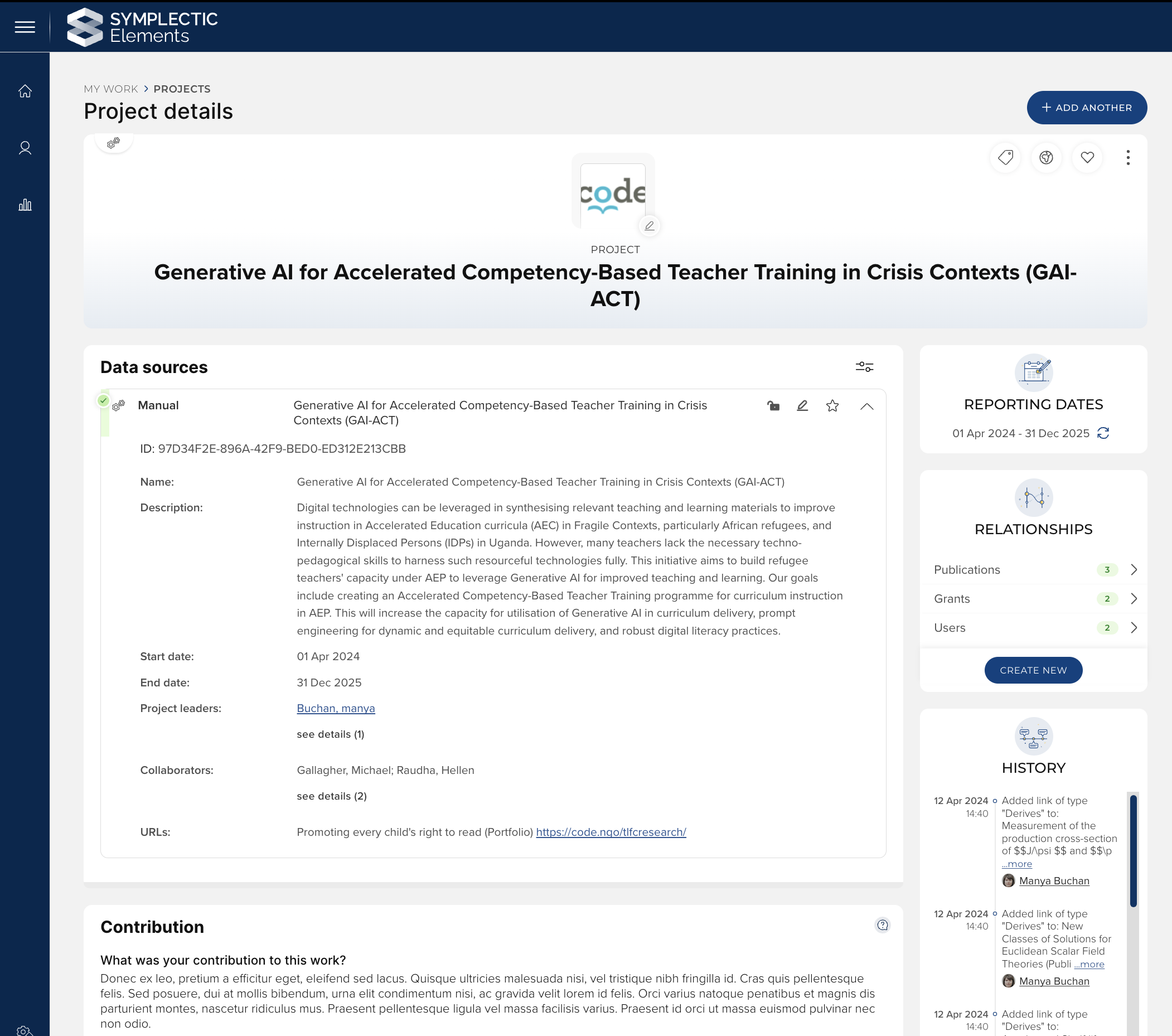
Image: Project details
To better support this, we have significantly enriched and expanded the longstanding Projects category within Elements to help organisations proactively capture research projects and their relationship. As a part of these extensions, we have introduced new configuration options which give organisations greater flexibility to tailor the data collection process to their needs.
Allow Projects to be created and modified by researchers
Up until now, the Projects category in Elements has been an ‘admin-managed’ category, which only allowed administrators with appropriate roles to add projects into the system. From this release, administrators can now choose to allow their researchers to create and modify Project content directly, opening up the category so that researchers can self-report their projects and associated activities. Enabling this functionality will give your researchers greater control to accurately capture their full portfolio of research activity, allowing them to fully describe the projects themselves and relate together Project inputs (e.g. Grants, Equipment) and outcomes (e.g. Publications, Impact, Professional activities).
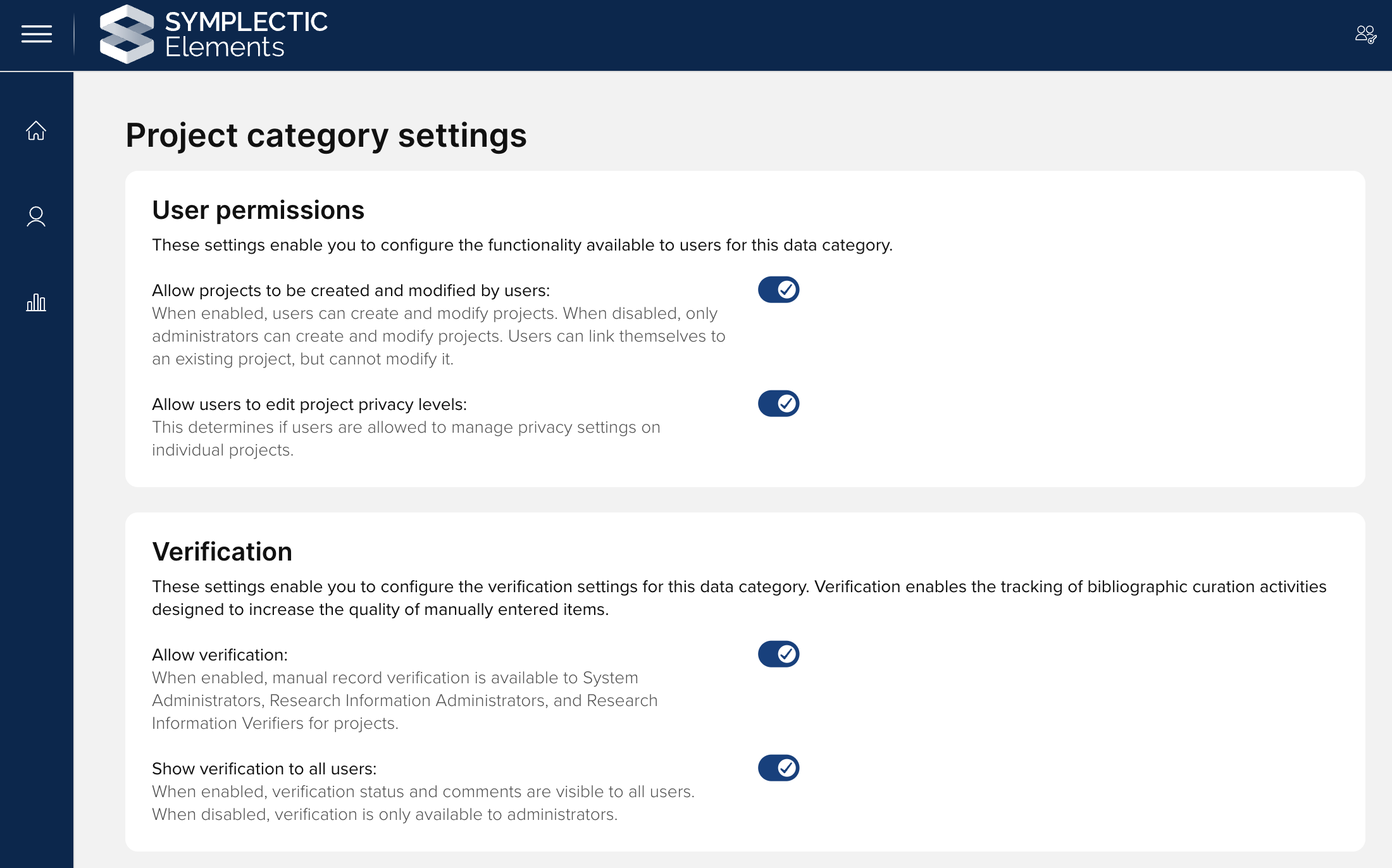
Image: Project category settings
New stock fields
As a part of this extension, we have expanded the stock fields available in the Projects data model to better support the collection of core metadata about projects needed to support future use cases for reporting and Discovery. New stock fields include:
Project start/end dates
Project leaders and collaborators (person lists)
Collaborating institutions (address list)
DOI
URLs (web address list)
Formatted description (html text)
All of these fields except formatted description will be enabled by default on the ‘Project’ type upon upgrade. We recommend that you review these configurations as a part of your upgrade testing process so that you can adjust the configurations as necessary.
Configurable module display names
To give organisations greater ability to position the Project category in line with the data you seek to collect, we have extended the available configurable module display names for Projects. It will now be possible to choose between the following display names:
Projects
Other activities
Research projects
Research activities
Research projects & activities
Research programmes
Research programs
Please note that as for the other Display name configuration options, this functionality will update the display name used within the Elements web application only, and the original name of Projects will be used in the Reporting Database and API.
Homepage tile and other new functionality
To encourage engagement in capturing projects, once access to the Projects data category has been enabled, users will see a new project tile appear on their homepage summarising the projects linked to their profile.
To bring projects in line with other data categories in Elements, we have also added the following additional functionality:
Ability to add lists of Projects to Assessment exercises
Ability to make Annotations available for Projects
Support for merging/splitting Projects and Project records
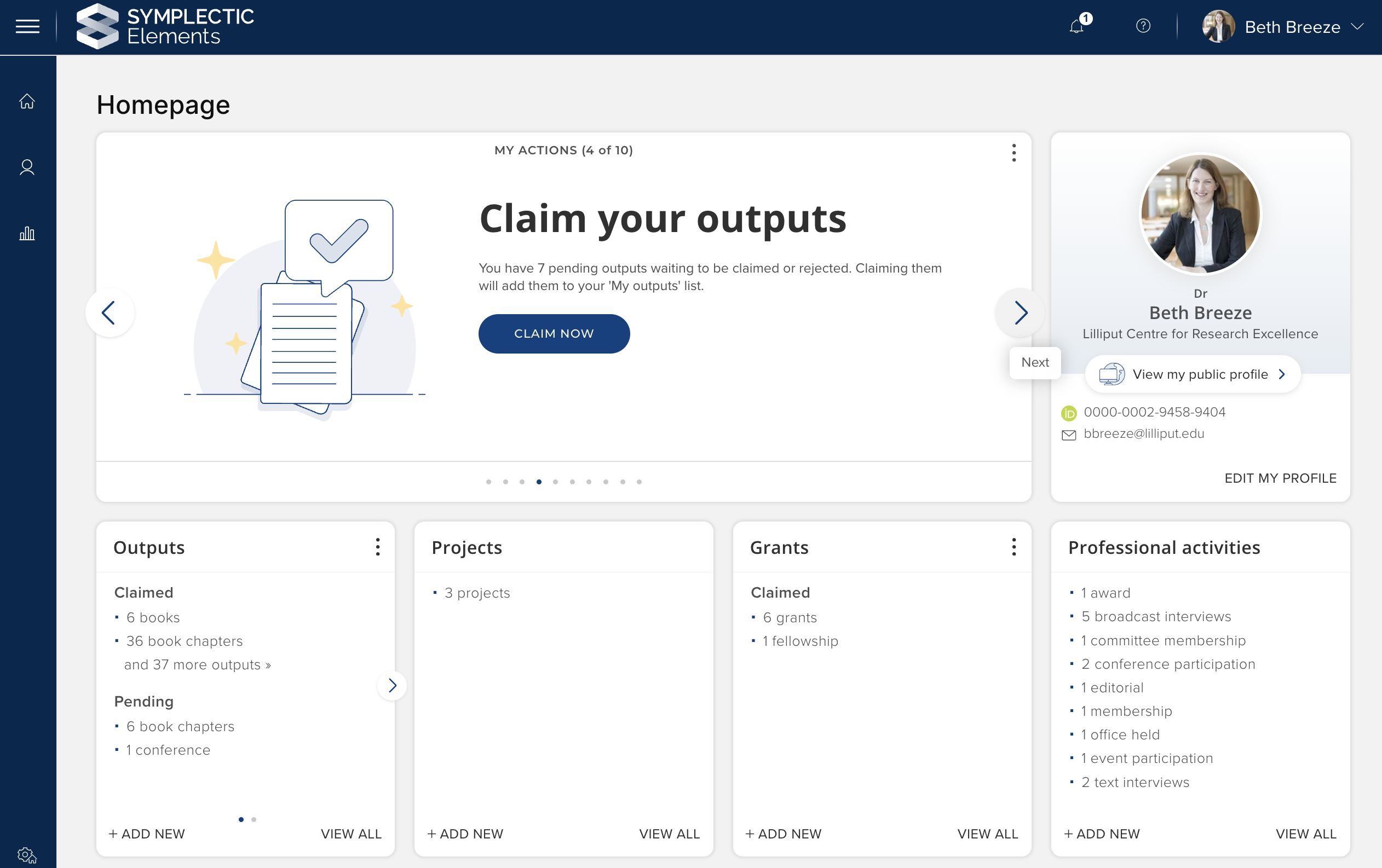
Image: Project homepage tile
Adopting the enhanced Project category
This release introduces a suite of enhancements to the Project category with significantly greater flexibility for how you may wish to adopt and use Projects in Elements. This provides an opportunity for you to review your use of the Project category and develop an approach to capture and track information on Projects in a way that best suits your organisation’s requirements. If you would like some guidance about these changes or to discuss how your organisation can make the most of Projects in Elements, please contact our team via support@symplectic.co.uk.
Further information is available in the Project Settings support article.
Discovery Module Enhancements
Responsive filters
An intuitive and effective search experience is essential to the Discovery Module, to help ensure that visitors can quickly and easily find relevant experts and equipment. In this release, we have continued our program of enhancements to the Discovery Module’s search experience, further updating Discovery’s filter behaviours by making them responsive.
The new responsive filters will automatically update the result counts displayed as each user engages with the filters section, selecting or deselecting offered filter options. By dynamically updating the counts alongside the filters, we can help users understand the impact of their filter selections, helping them build their search effectively and minimising the risk that they do not find any relevant results.
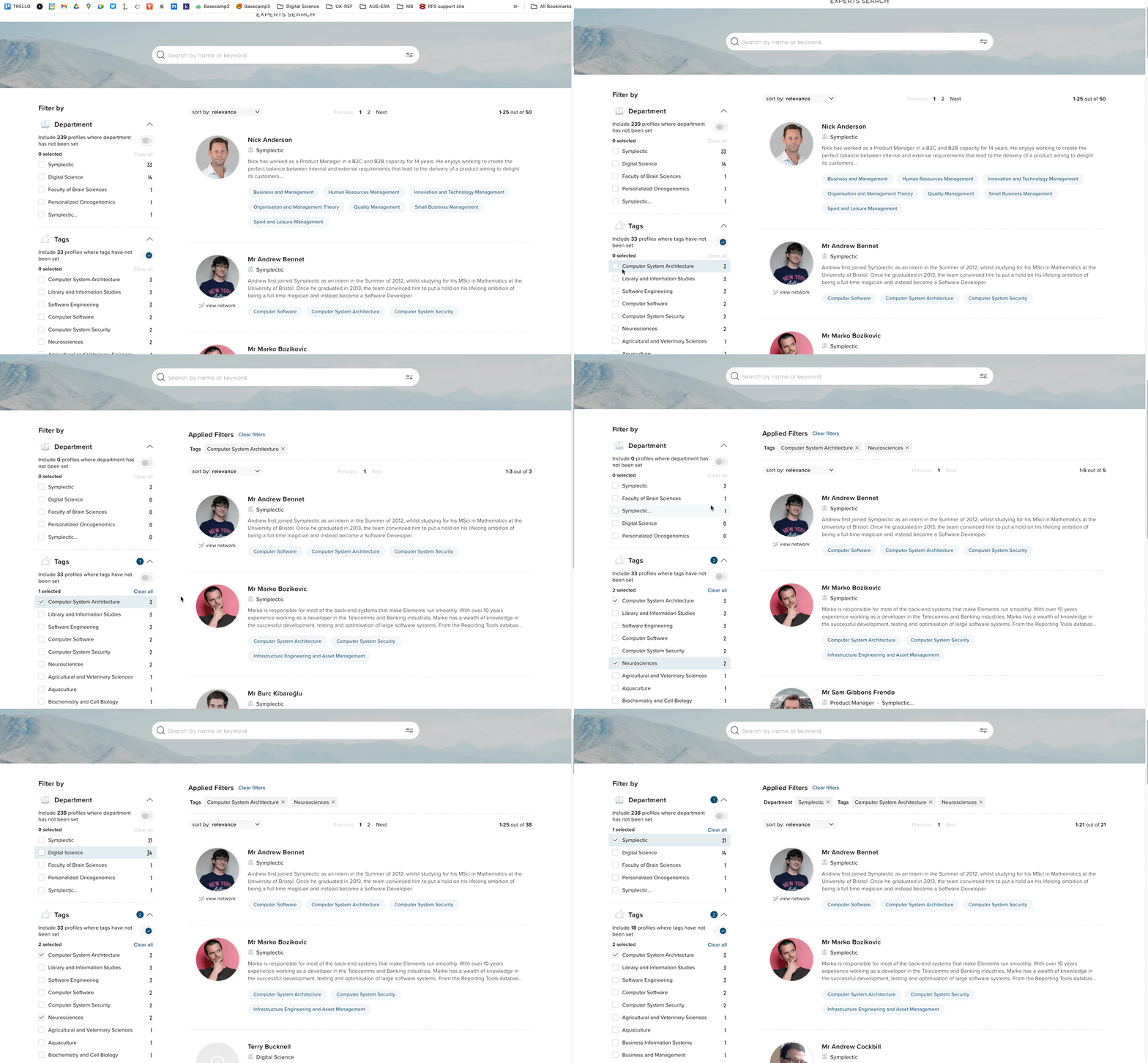
Image: Responsive filters in Discovery
SEO improvements
Search engines play a key role in helping visitors find Discovery profiles, expanding the reach of the sites and helping draw in potential collaborators. Our data shows that typically, up to 60% of visitors begin their user journeys before they arrive at the site, looking for an expert of interest via Google Search.
We continue to invest in search engine optimisation (SEO) for Discovery to ensure we stay in step with the evolving indexing requirements for platforms like Google. By continuing to improve our SEO capabilities, we're ensuring that valuable research profiles are prominently featured, bridging the gap between scholars, institutions, and knowledge seekers.
Excluding unverified records from Discovery
In a recent release (v6.16), we expanded Elements’ verification functionality, making verification configurable for all of the main data categories in Elements. In this release, we have built upon that capability, introducing new configuration settings which allow administrators to choose to exclude unverified manual records from Discovery for each data category. This functionality allows organisations who choose to invest in reviewing and verifying the metadata capturing within the system to configure their Discovery instance so that only the highest quality, curated data is showcased publicly.
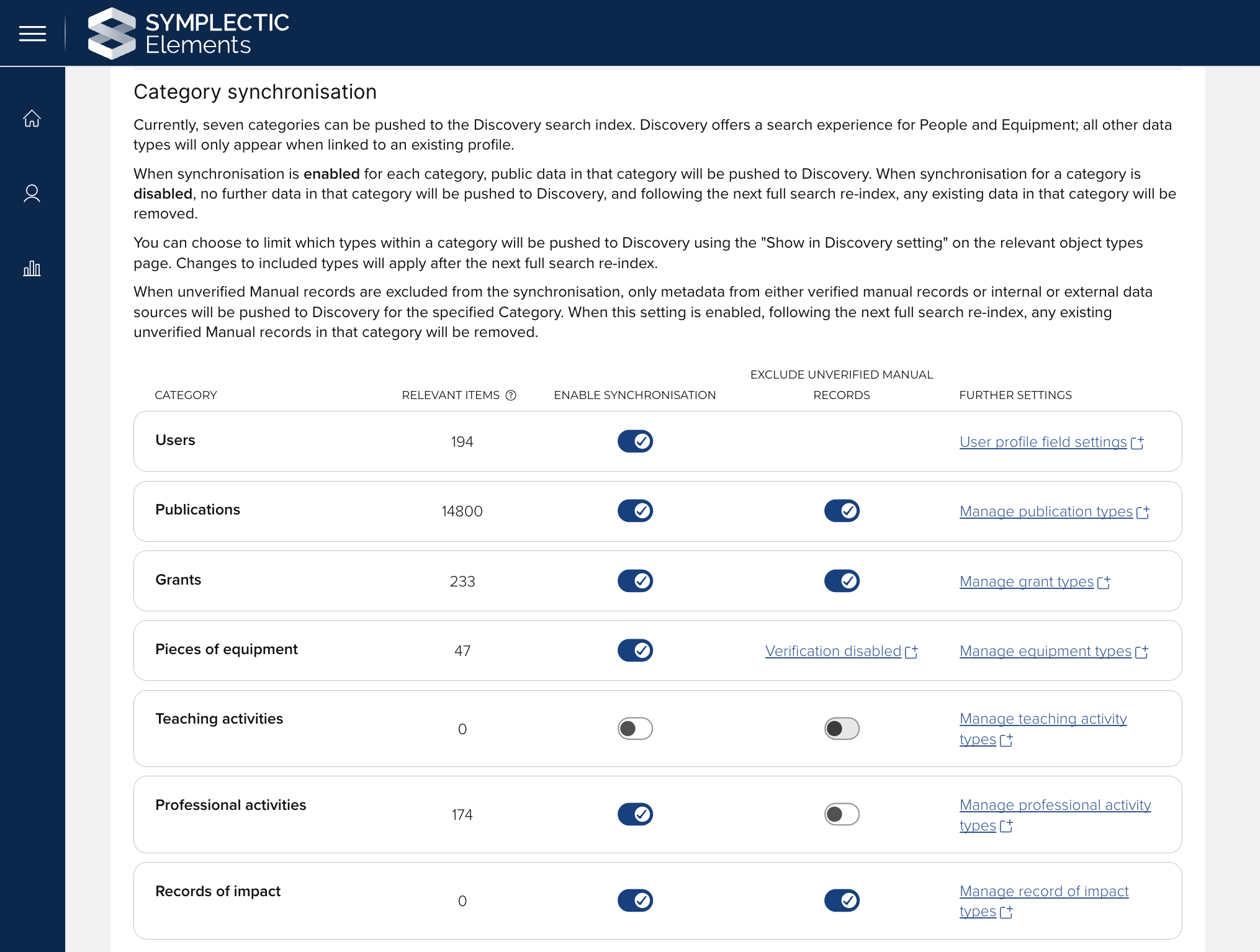
Image: Exclude unverified manual records from Discovery
To exclude unverified manual records for a particular data category from Discovery, verification must first be enabled for that category. When unverified Manual records are excluded from the synchronisation, only metadata from either verified manual records, or internal or external data sources, will be pushed to Discovery for the specified Category. By default, the setting is disabled for all categories and when enabled, any existing unverified Manual records in that category will be removed following the next full search re-index.
Enable Equipment profiles via Elements
As a part of our commitment to streamline administration, we are continuing to increase the Discovery configuration options available directly to clients via the Elements administrative UI. In this release, we have introduced a new action on the Discovery Configuration page for enabling Equipment profiles in Discovery. When Equipment profiles are enabled using this setting, Equipment profiles will be visible across Discovery and will be available for dedicated searching. To ensure that Equipment data is pushed to Discovery, you must also enable the synchronisation of Equipment data on the Manage Discovery data page.
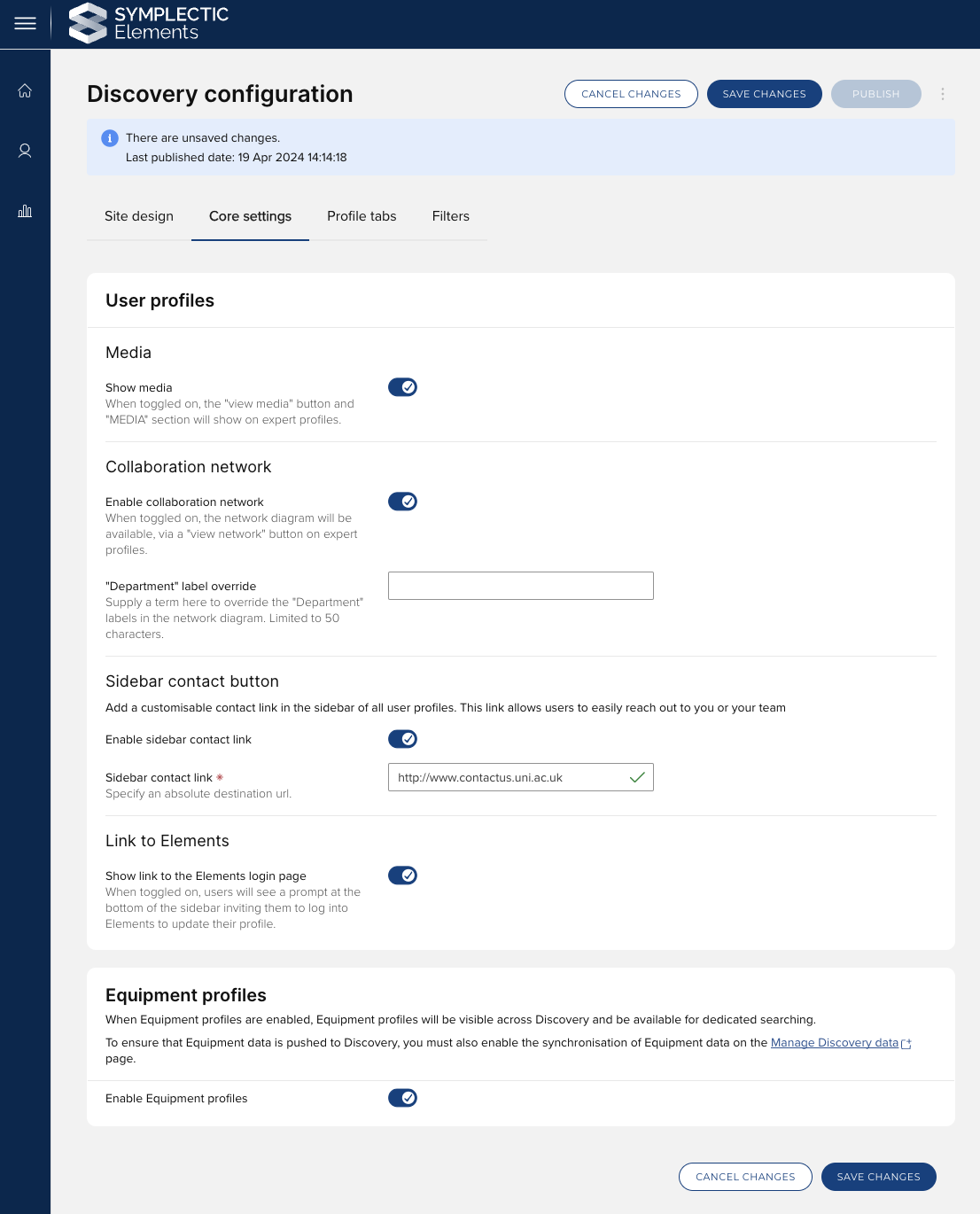
Image: New configuration options for Discovery
Introducing the group feed
Groups play a crucial role in organising user data within Elements, supporting system configurations and underpinning reporting and analytics. In this release, as the culmination of a series of significant enhancements to the Elements Groups functionality, we are excited to introduce the ability to manage your group structure automatically via a feed into Elements.
The new Groups feed allows organisations who have a ‘source of truth’ for Groups data to integrate that source with Elements, streamlining the creation and maintenance of the Elements Group structure. Once implemented, the new feed will fetch and process a file from a defined S3 bucket as per a defined schedule. The selected file is then tested against a set of safety cut-offs that you have configured, and provided that no cutoff thresholds are met, the necessary changes will be automatically applied within your Elements instance. This automation ensures that your organisational hierarchy is always up-to-date and accurately reflected in Elements.
Scheduling the feed
Building upon the foundational capabilities of the group importer, the feed is simple to schedule from the new ‘Group feed’ tab on the Group import settings page. The group feed can be scheduled to run at intervals that align with the frequency of data changes in an upstream system, ensuring that Elements is always in sync with your most current group structure. This feature allows an accurate and near-real-time reflection of your organisational structure to be maintained within Elements.
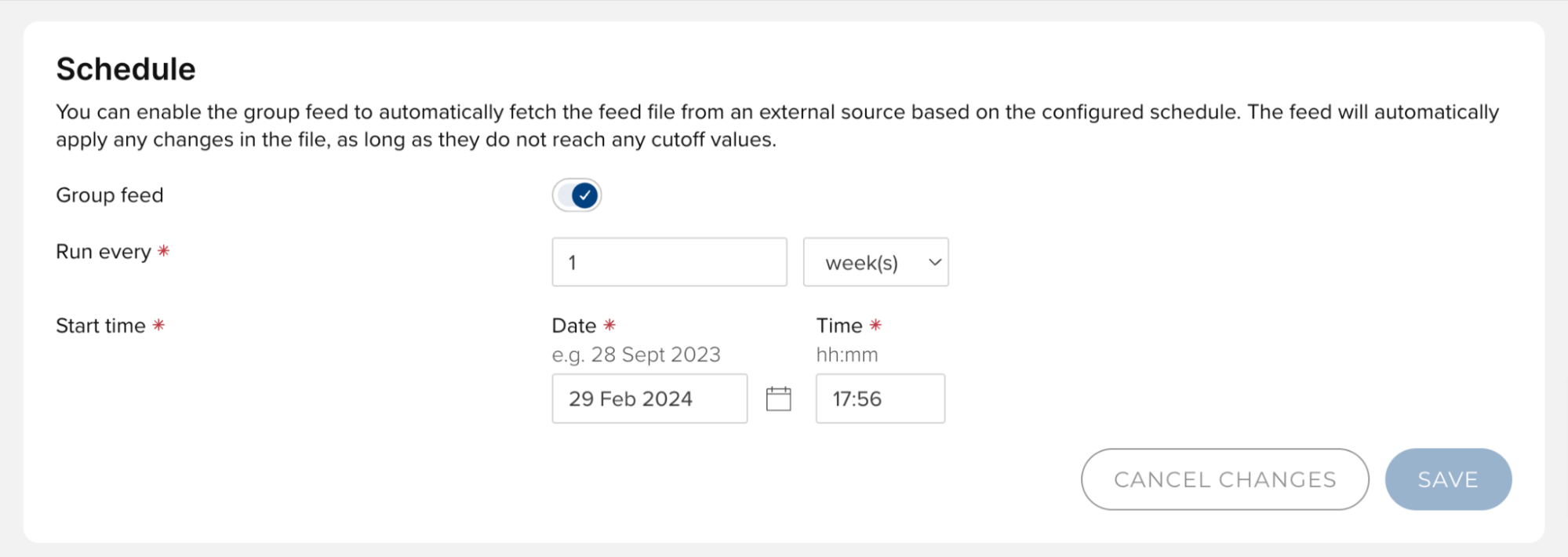
Image: The group feed can be enabled with the click of a button. It is simple to schedule a recurring job to fetch the group feed file from an external data source.
Managing credentials to Amazon S3 storage
For hosted Clients, Elements will automatically provision an external file location using Amazon S3 storage. The ‘Uploader account management’ page allows access credentials to be provisioned from within Elements. You can quickly generate new sets of credentials, enable or disable credentials as needed, and remove any set of credentials - immediately revoking associated access permissions. These controls allow you to manage your Amazon S3 access directly within Elements.
Viewing feed activity & notifications
To provide administrators with easy oversight of the Groups feed, Elements will display a dedicated 'group feed status' section on the group import page whenever the feed is enabled. This provides details of the feed's status, including its frequency and the next scheduled execution. The system can also send email notifications when the feed completes successfully, if cutoffs have been reached, or if the feed fails. This proactive notification system ensures that decision-makers are always informed of the activity of the feed.
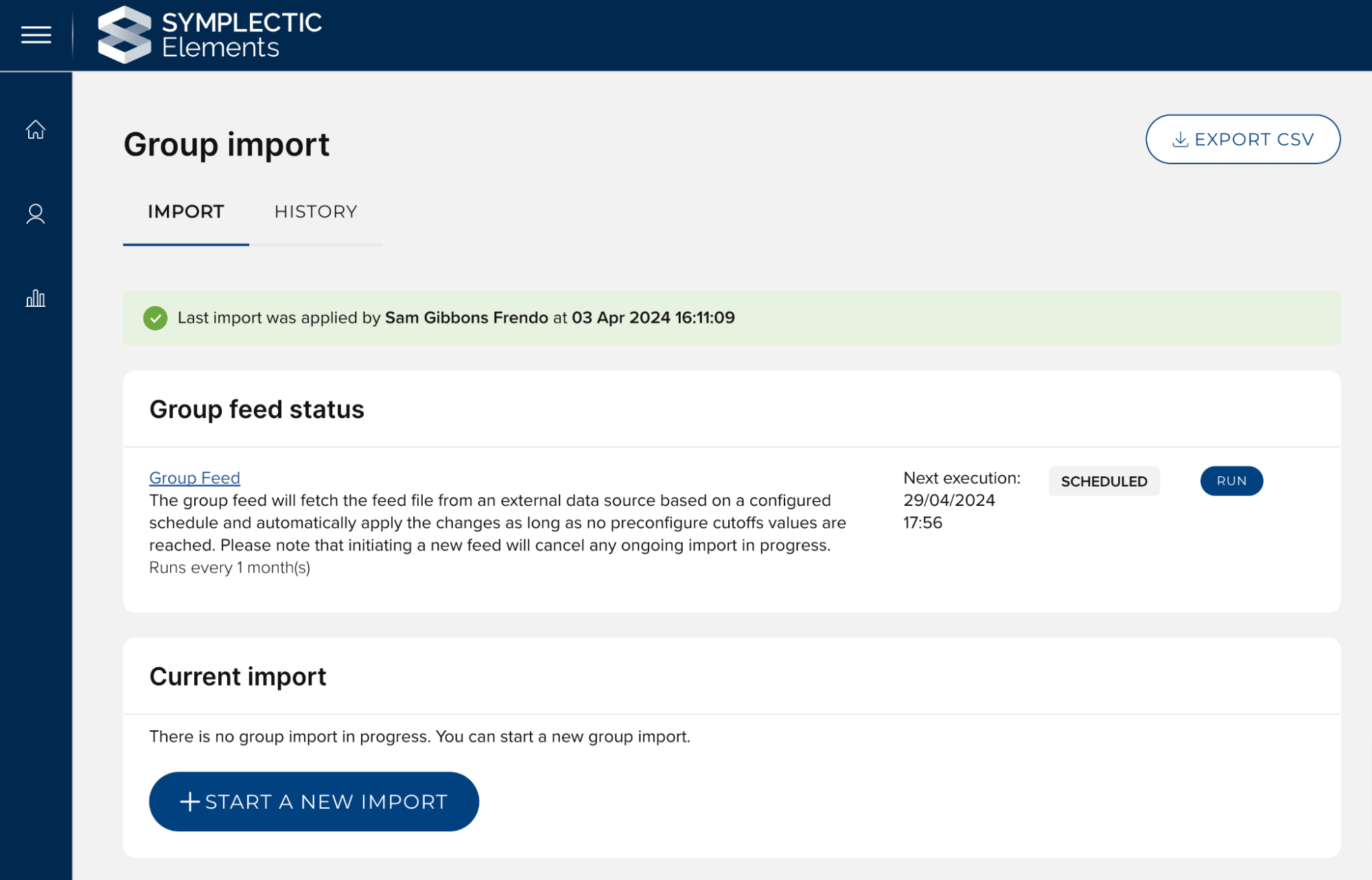
Image: Once enabled, the status of the group feed will display on the group import page. The system will automatically fetch the feed file from an external data source and apply changes to the system if predefined cutoff values are not met.
Ensuring administrative control
We recognise that sometimes things don’t go according to plan, so to give Administrators additional control and the flexibility to update group data more dynamically, in addition to the scheduled feed, Elements always offers administrators the ability to manually initiate feed runs or begin a new manual import. This ensures that administrators will always be able to immediately respond to the needs of your organisation should the need arise, without waiting for scheduled feeds to run.
The feed configuration process also allows you to configure a set of cut-offs, which will prevent the feed from being automatically applied should the number of changes exceed the number permitted. If a cut-off is triggered, the feed will not be automatically applied and administrators will be notified by email that they need to review and approve the changes before they are applied.
The group feed provides greater automation, helping to streamline the management of your organisational group hierarchy. The group feed lessens the administrative workload by ensuring your organisational structure remains up-to-date in Elements with minimal manual intervention. Further information about the Groups feed can be found on our Support site, including:
Information about configuring the external management of groups
Information about the use of cutoffs
information on how you can configure the group feed
If you have any questions, please raise a support ticket and we will be happy to help.
Other updates to group functionality
Web addresses and social media links for Groups
In preparation for the introduction of Groups pages to the Discovery Module, the data model for stock Group types has been expanded to include a new stock field for External links, enabling you to capture web addresses and social media links for Groups.
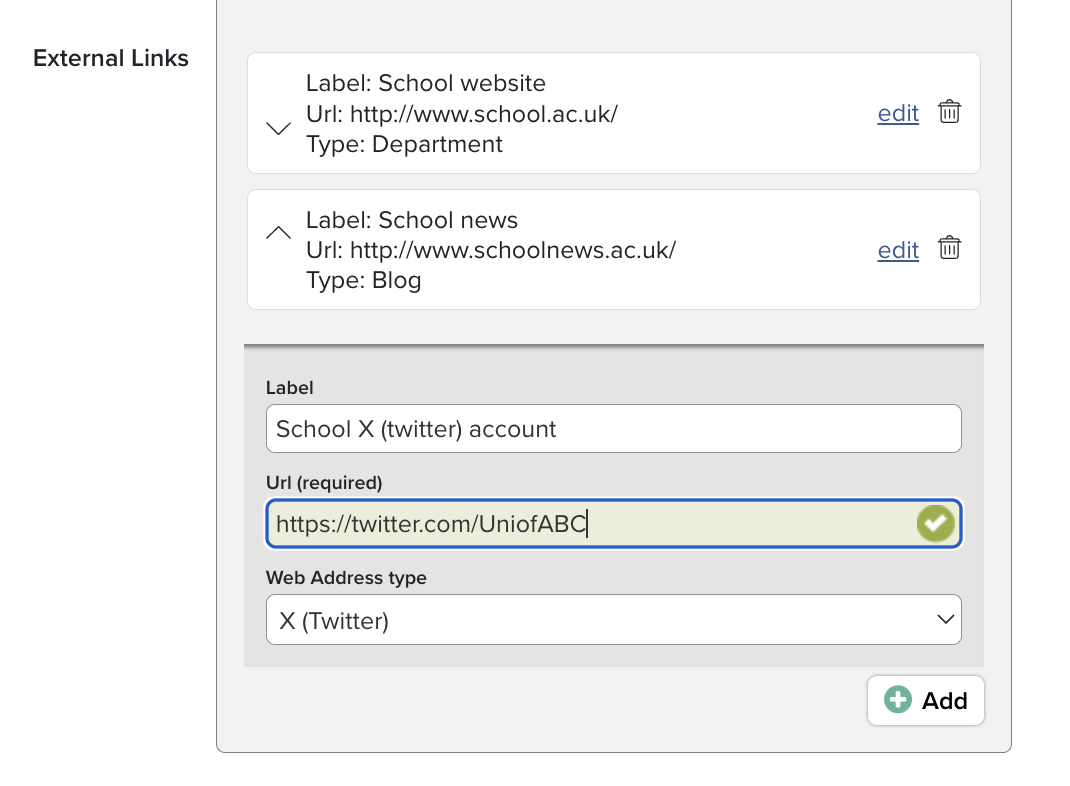
Image: Adding external links to Groups
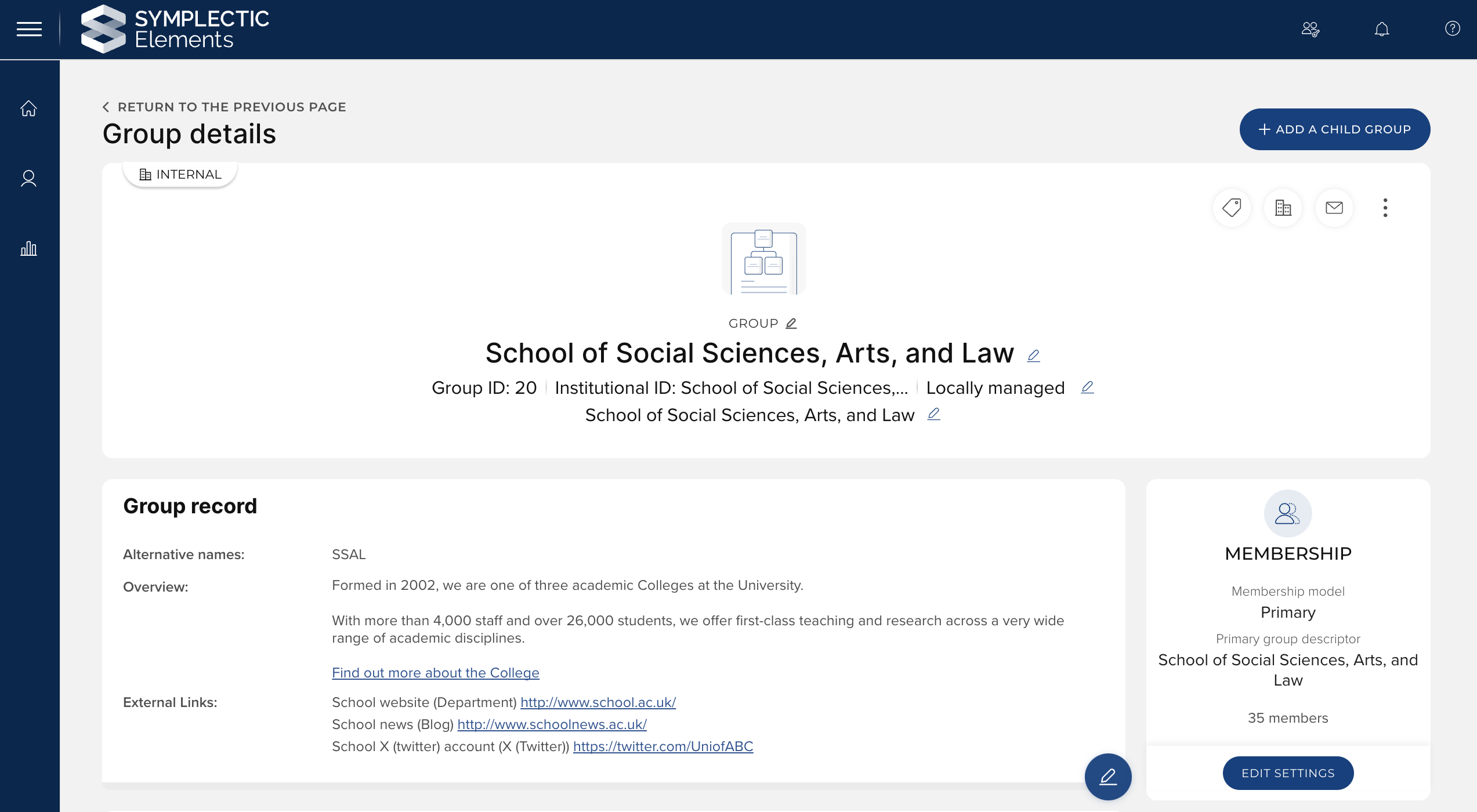
Image: Group external links
Formatted Overview for Groups
We have updated the Group ‘Overview’ field to capture data via an HTML editor. This new functionality will give you greater control to describe Groups by allowing you to incorporate formatting as well as links to related information.
The ‘Overview’ field is now presented with an editor which supports a range of HTML formatting, including:
Text formatting options: Bold, italic, underline, subscript, and superscript.
Text layout options: Indents, bullets and numbered lists.
Hyperlinks.
Please note: Due to accessibility and security considerations, the HTML editor does not support embedding images or tables, or the use of custom HTML.
Upon upgrade, the ‘Overview’ field will be automatically rolled over from Text to HTML, preserving any data already captured and making it easy for you to then add any desired formatting.
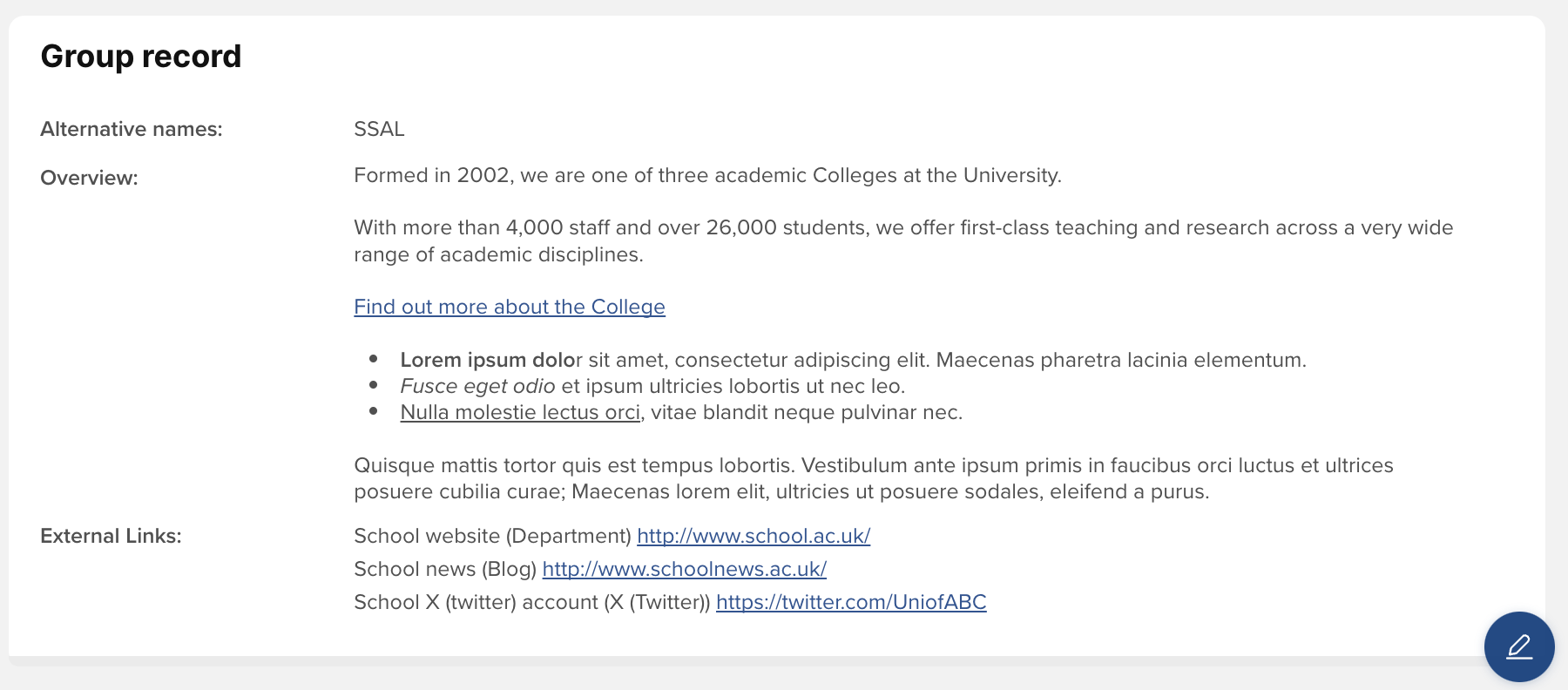
Image: Formatted ‘Overview’ field for Groups
Implications for the Elements API
In the API, the new underlying field overview-html contains the new HTML-formatted version of this data. To ensure backwards compatibility, a plain text version of the new field's content will be provided in the same way as the original overview field, i.e. the data in the overview-html field will be transformed into plain text and made available under the previous name of overview. You can also write plain text data to overview in a POST, PUT or PATCH request; it will be transformed into HTML for storage in overview-html. This should ensure that any existing integrations using the overview field will not break upon upgrade, allowing you to review and update them at a time of your choosing.
Additionally, the same plain text version of the overview is made available in the plain-text XML attribute of the overview-html field. New integrations needing the plain text version of a group overview should obtain it from this attribute, in preference to using the overview field, which is provided to maintain backward compatibility.
Implications for Reporting
If you have custom SSRS reports, data extracts, dashboards or other reporting database queries which rely on the overview data being plain text rather than HTML, go to the System Admin > Group Management > Underlying Fields page and enable the “Plaintext in reporting” setting for the overview-html field. This will populate the [overview-html plaintext] column in the [Group] and [Group Record] tables with the plain text version of the HTML. Your custom queries will also need to be adapted to use the new column instead of the previous [overview] column which has been removed from the database.
Admin page re-designs
In this release, we have redesigned the following pages, bringing them up to date with our latest technology and delivering accessibility improvements.
Data source management page
We have re-designed the Data source management page (System Admin > Data Sources > Data Source Management), including replacing the Data source intersection visualisation with a downloadable report.
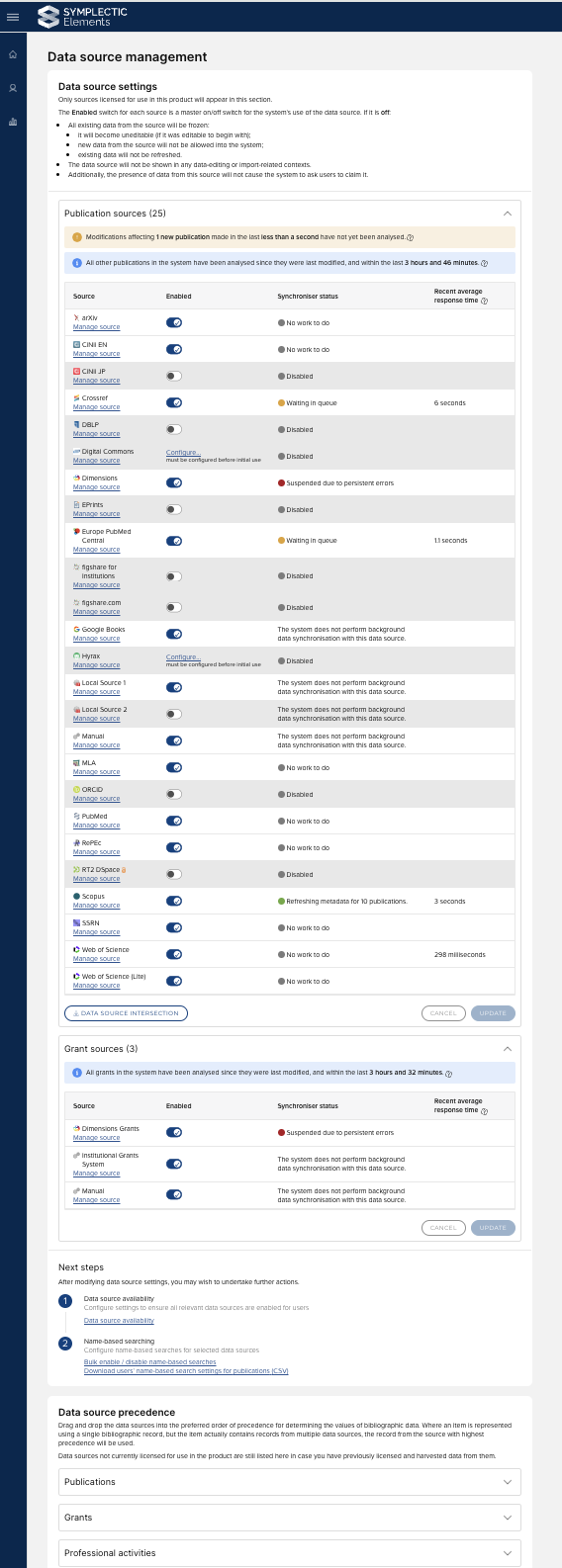
Image: Data source management page re-design
Building on the expansion of verification functionality across all data types (v6.16), the updated version of the Data Source management page also allows administrators to configure record precedence for all data categories - not just Publications, Grants, and Journals - giving you more control over your data and how it is presented.
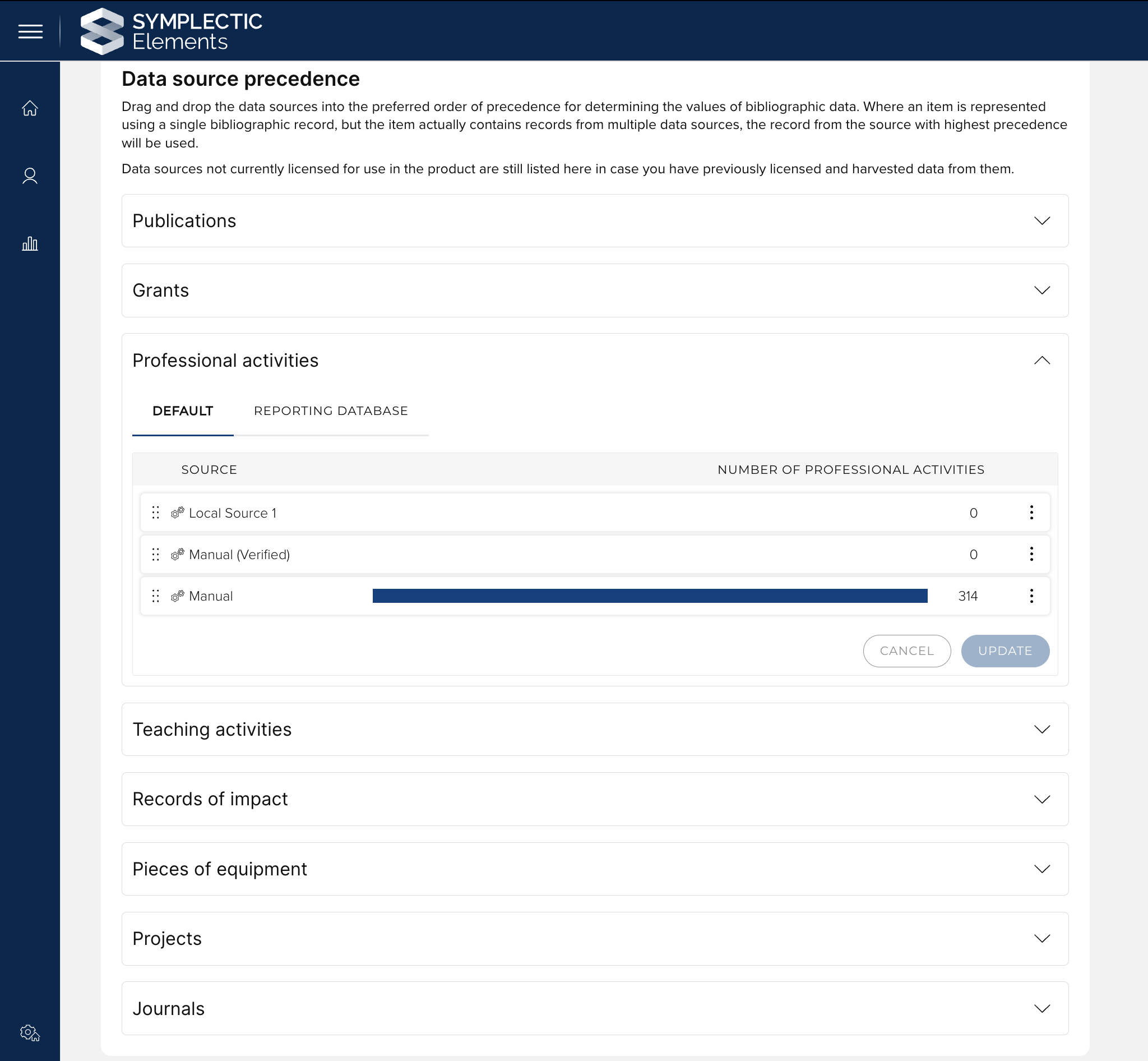
Image: Data source precedence configuration
Additional page redesigns
We have also updated the following pages, in each case we have updated the design of the page and made accessibility improvements but no other functional changes:
Home page actions configuration page
Objects types page
Underlying fields page
Research Funding Solution
In this release, we are pleased to introduce a number of improvements to the admin function when creating related funding projects, helping users better navigate and ensure they have all relevant data available. This includes:
Introducing a new summary table of the parent project’s details, visible when creating a related sub-grant.
Adding ‘Managing group’ to available fields to update when creating a sub-grant.
Updating the 'Select target grant' screen for Budget Transfers to only display direct parent/child relationships.
As with previous releases, full details of the RFS functionality released in v6.18 are available in the RFS release notes on our support site.
Other improvements
We have updated the lock and edit buttons, providing a more easy-to-read and intuitive design to help users more easily discern the state of the field (whether locked or unlocked), and whether editing is available.
The ‘redeposit’ linktooltip text on publications has been updated to read ‘Add a file to the repository item’, to make the outcome of the redeposit action clearer to users.
We are continuing to improve the accessibility of Elements and Discovery with some minor improvements delivered in this release.
The R3 data source has been retired and will no longer appear on the data source management page.
UPDATE: For clients upgrading after the 20th of May 2024, we have released a patch for Discovery that updates the fonts used in Discovery, moving the primary font from Proxima Nova to Inter. The new font has a stronger font weight and will improve readability of content on Discovery.
Fixes
There was an issue for clients feeding in NULL values to ‘Money’ field types that could result in an empty field being displayed to end users in the UI. This has been fixed.
Publications with a publication date prior to 1900 were not accurately pushed to ORCID. This has been resolved.
We have fixed an issue where the ‘User profile completeness’ data extract and ‘User profile completeness by primary group’ dashboard generated empty results.
The year filter for the following stock reports stopped at 2021 - we have updated this to include 2022, 2023, 2024, and 2025:
Grants with linked publications,
Publication collaboration,
Publication comparison - group A vs group B,
Publication volume.
If very long, a publication’s title could fail to display correctly on the Seek duplicates page, when requesting a waiver, or on the Manage links page. This has been fixed.
We have fixed an issue on a number of pages where users were presented with a ‘You have unsaved changes’ pop-up when navigating away from a page where no changes had been made.
We have resolved some issues with filters in Discovery where:
Selecting a large number of filters once could lead to an error being generated.
The ‘Include profiles where tags have not been set’ toggle for the Tag filter did not behave as expected when a filter value was selected.
End of support
As always, we recommend you regularly review our End of Support Announcements for information about upcoming end of support in Elements for various technologies. We would like to draw your attention to the upcoming end-of-support dates for versions of Elements. Upcoming dates include:
Elements version | Release date | End of support date |
6.17 | 29 February 2024 | 28 February 2026 |
6.16 | 7 December 2023 | 7 December 2025 |
6.15 | 12 October 2023 | 12 October 2025 |
6.14 | 6 July 2023 | 6 July 2025 |
6.13 | 27 April 2023 | 31 October 2024* |
6.12 | 23 February 2023 | 31 October 2024* |
6.11 | 8 December 2022 | 31 October 2024* |
6.10 | 6 October 2022 | 6 October 2024 |
6.9 | 21 July 2022 | 21 July 2024 |
6.8 | 19 May 2022 | 19 May 2024 |
We would also like to draw your attention to the forthcoming migration of Elements to Elasticsearch (the target release for the first version of Elements to require Elasticsearch will be the first release of 2025). Further details are available in this support article.
If you need assistance in planning to upgrade, please contact our team via the Support Site.
We’re here to help!
We hope you enjoy getting to know the latest version of Elements. Remember should you have any questions, we’re here to help! Just contact us at support@symplectic.co.uk for assistance.
Best wishes,
The Symplectic Team