
Symplectic Elements v5.21 - Release Notes
Elements v5.21
Introduction
Welcome to Elements v5.21!
Our latest release includes some important updates to core functionality within Elements, used by our community around the world.
We have redesigned the way we create and update reporting dates, reducing administrative burden by introducing automatic updates, and maximising data completeness by introducing a new precedence order for selecting which dates should be used to set the reporting date.
In anticipation of the introduction of our new reporting hub, we’ve added the ability to view Elements’ stock dashboards to the Elements ‘core’ licence, so that all organisations using Elements can use our core set of web-based interactive dashboards. We’ve also upgraded the DevExpress dashboard designer, introducing both new formatting options as well as performance improvements.
This release also includes some additional REF2021 functionality developed in response to client feedback and updated guidance from the REF team plus a number of other enhancements across the system.
The new version of Elements and associated upgrade instructions can be found in the upgrade forum.
Introducing automatically managed reporting dates
Reporting dates have been a core concept within Elements for a long time, providing a consistent set of dates which can be used when generating reports as well as to sort or filter data within the system. Since the original reporting date functionality was introduced, some of the core patterns in scholarly publishing have evolved, leading to a wider range of dates being collected within Elements and a need for us to redesign this fundamental functionality.
Our new reporting dates functionality provides organisations with an enhanced ability to configure which dates should be used to set the reporting date for each type within Elements by setting a ‘preference list’. Elements will then automatically recalculate reporting dates, updating them automatically as new ‘higher-preference’ data is added to the system.
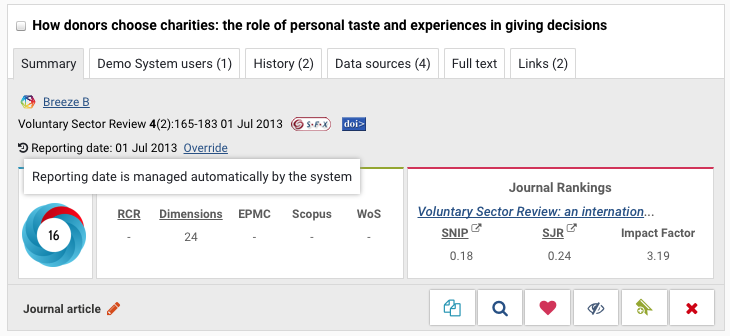
Image: A tooltip highlighting that a reporting date is being automatically managed by Elements.
About reporting dates
A reporting date is a ‘master’ date for an output or activity within Elements (e.g. a publication, grant, teaching activity or professional activity). It is inferred from dates captured in each of the item’s records but is stored separately to ensure Elements has a consistent date which can be used for managing data within the system.
Until now, reporting dates were set once by the system when an item was first created, and would only be updated when a manual record was edited or if the reporting date was adjusted directly. Each reporting date has, until now, been based on one underlying date field selected by the institution (e.g. publication date).
‘Field-precedence’ and the new reporting date calculation
System administrators can configure a new reporting date ‘field precedence’ for each type within Elements which will be used as the basis for the new reporting date calculation. This field precedence will determine the order in which different types of dates should be used when setting reporting dates within Elements. It can be configured separately for each type within the core data categories (eg. you can set the field preference to be different for Journal Articles and for books or for each type of Professional Activity) allowing you to tailor the calculation so it will only include dates which are relevant to your organisations’ needs.
To configure the field precedence you place the dates you wish to include in the reporting date calculation in a list in order of priority, and place any dates you wish you exclude from the calculation into a separate section.
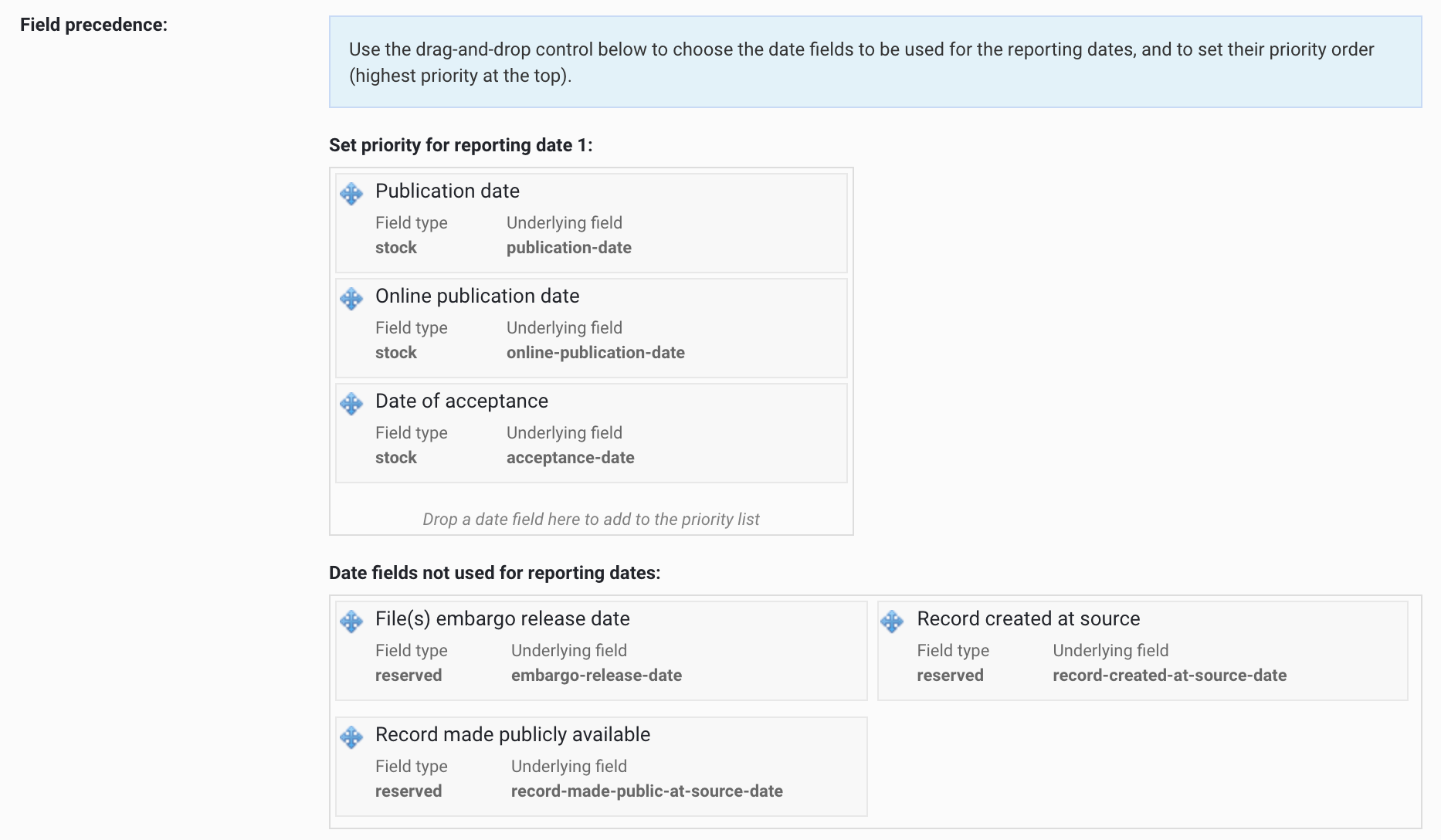
Image: Setting the reporting date field precedence for Journal Articles in Elements.
Elements will then use this field precedence in combination with your organisation's data source precedence and the granularity of the available dates to calculate which date should be used to set the reporting date.
Reporting dates will be automatically recalculated as new information becomes available (eg. additional records are added to the system) and when a higher precedence date becomes available Elements will automatically update the reporting date accordingly.
For additional information about the new reporting date calculation, including some examples, please see our Support Site.
Manually overriding Reporting dates
There may still be times when a researcher or administrator wishes to set a reporting date manually. When you override a reporting date manually, the system will automatically switch that date to ‘manual mode’ so that it will no longer be automatically updated by the system. If desired, you can also switch reporting dates back to being automatically managed by Elements.
Conservation of settings on upgrade
When you first upgrade to Elements v5.21, any reporting dates that have previously been set by a user either manually or via the API will automatically be set to ‘manual mode’ to prevent changes to previously curated data.
The system will also automatically map the date fields within your Elements instance to create a new default set of reporting date field precedences. The date(s) you currently use as the underlying fields for reporting dates (ie. prior to v5.21) will be automatically set as the highest precedent date after your upgrade and additional dates will be added based on our new default settings. We recommend that after upgrade you review the new reporting date field precedences within your instance of Elements and adjust as desired.
Additional information about conservation of reporting date settings on upgrade can be found on the Support Site.
View stock dashboards
We have added the ability to view Elements’ stock dashboards to the Elements ‘core’ licence, so that all organisations using Elements can use our core set of web-based interactive dashboards. Our collection of stock dashboards includes a range of output/activity dashboards for quickly and easily exploring trends relating to the data collected in Elements as well as administrative dashboards which help you monitor the use of Elements.
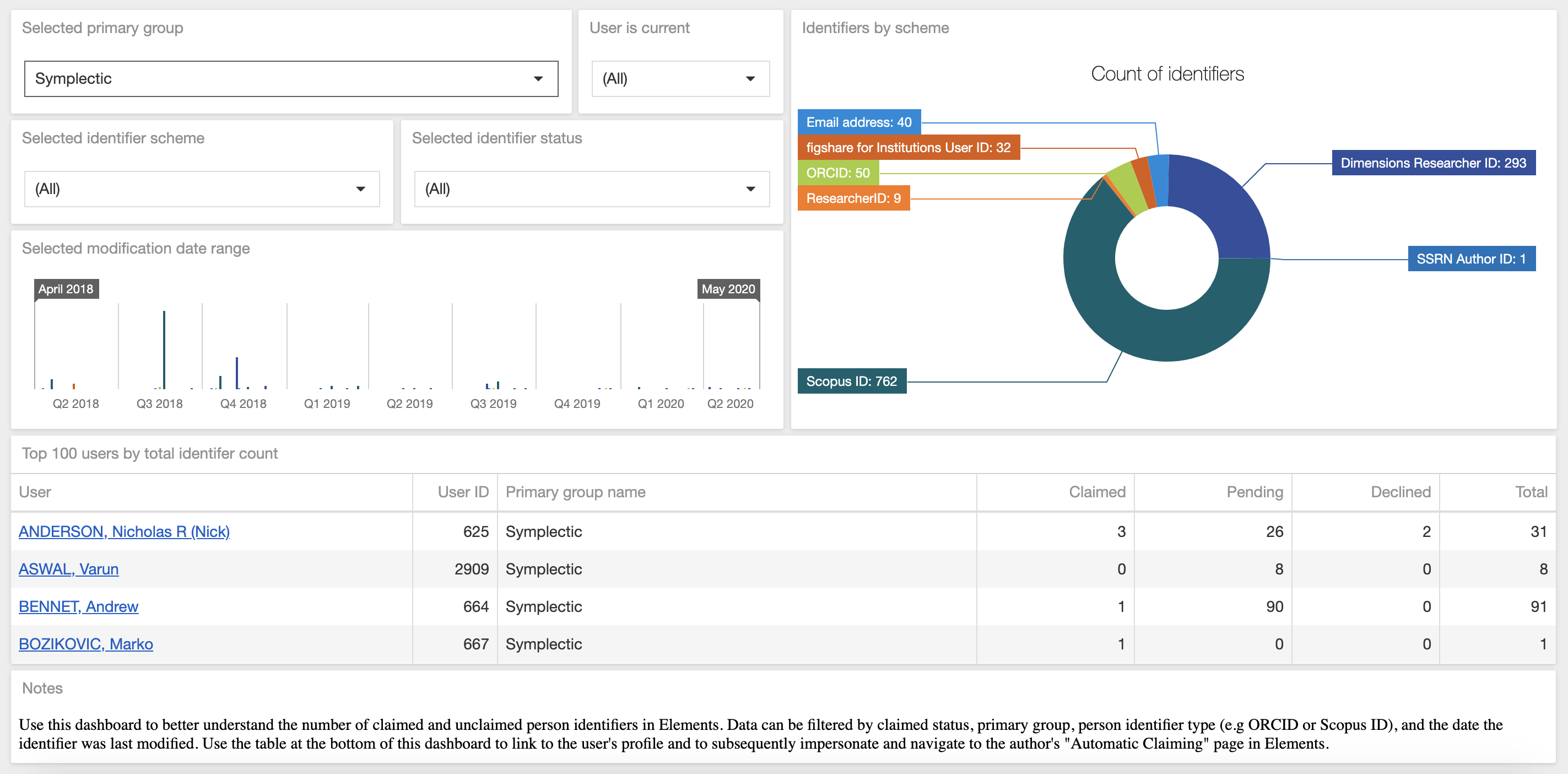
Image: The User Identifiers by Scheme stock dashboard helps administrators review claimed and unclaimed researcher identifiers in Elements.
The Elements stock dashboards draw data from both the Reporting Database and the Analytics Database and both must be installed to use this functionality. Stock dashboards can be enabled and access permissions can be set via the Manage Dashboards page in the Module Admin menu. In order to create, copy or edit dashboards, a licence for the Elements Analytics Module is required. For more information about Elements dashboards, please see the Support Site.
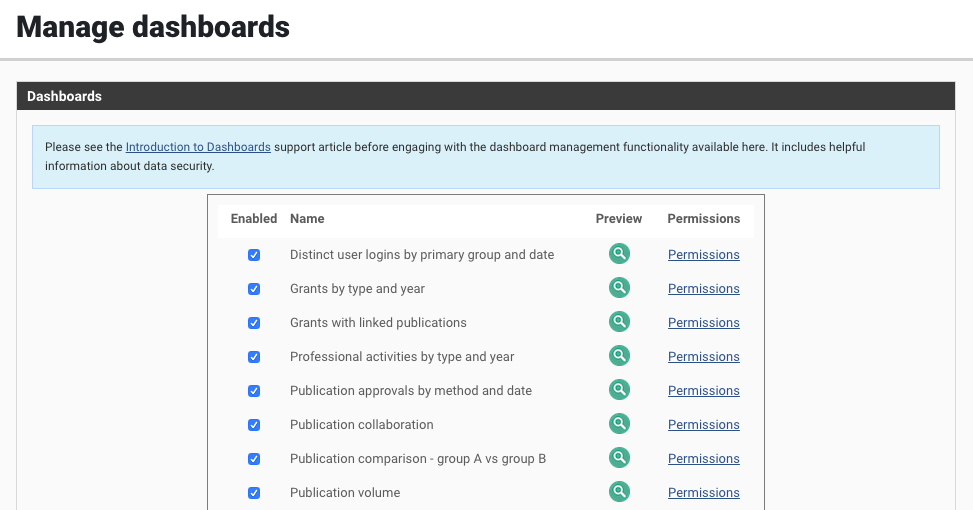
Image: On the ‘Manage dashboards’ page it is possible to enable and disable dashboards as well as set the viewing permissions per dashboard.
Dashboard designer upgrade
We have upgraded the DevExpress dashboard designer (underpinning the Elements dashboard functionality) from version 19.1.7 to version 20.1.3. This upgrade introduces a number of improvements to the dashboard designer including both new formatting options as well as performance improvements. It also lays the foundation for future additions to dashboard functionality. Highlights from the upgrade include:
A new rich text editor, allowing you to add custom formatting to text boxes on dashboards including support for embedding links and images.
The ability to add a filter expression for a single Measure bound to a Dashboard Item (i.e. you can filter a single Measure to be calculated only for a specific time period or for a specific value). This feature will be useful for those that wish to compare data from parallel periods e.g. a comparison of logins by month in different years (see image below).
New conditional formatting functionality for cards to help you create more visually appealing and more informative data visualisations.
For additional information please see the DevExpress release notes for version 19.2 and 20.1.
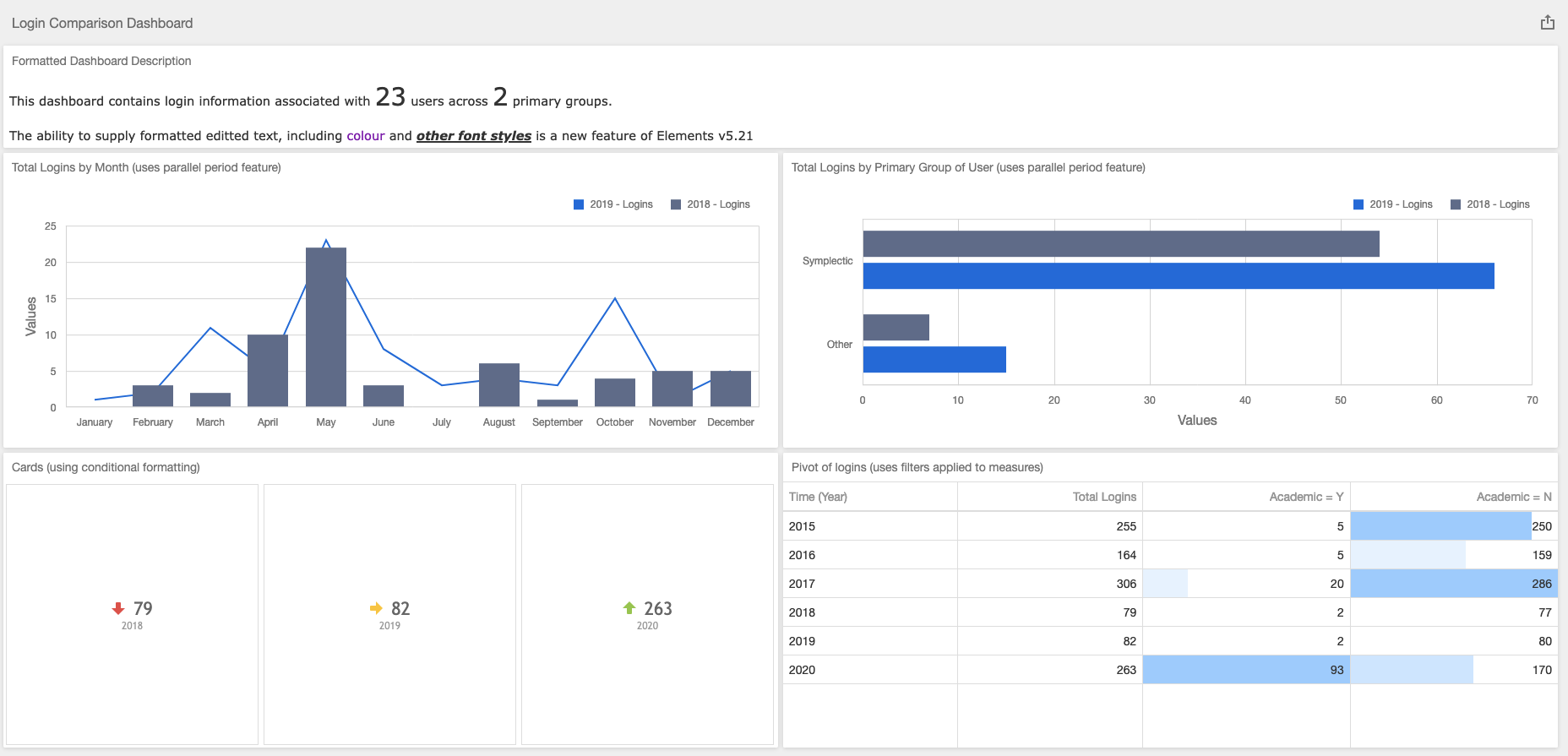
Image: Example dashboard showcasing some of new dashboard designer features.
REF2021
This release includes some additional REF2021 functionality developed in response to client feedback as well as updated guidance from the REF team.
We have updated functionality for managing outputs produced in a language that is not English but which falls within the remit of the Unit. These updates were implemented based on updated guidance from the REF team on how to return such outputs in the submission XML without generating validation errors. The associated updates include:
Addition of a new field in the ‘Data requirements’ tab on the REF2 form
Addition of a new field in the REF2 Outputs stock report
Addition of a new field in the REF2 Metadata bulk job
An update to the Submission XML generation logic
An update to the REF validation stock report logic
We have added a new ‘REF2 Modified publications’ stock report to help institutions identify REF2s where the underlying publication metadata may have changed due to records being merged, split, or added to a publication. Further information is available on the Support Site.
We have improved error messaging for the Reviewer content bulk job when multiple selections match the object ID provided.
Please note that the above REF functionality was also released as part of the 5.20.0.2685 patch.
In this 5.21 release, we have also introduced updates to the REF validation stock report to:
Add validation for word count on REF2 English abstract field
Add validation for missing REF2 Output type
These updates will also be included in an upcoming 5.20 patch release.
Other improvements
Introduced several improvements to enable faster indexing within Elements. We anticipate that on average, these changes will reduce reindexing time by up to a third.
The Europe PubMed Central data source integration has been updated to take into account a change introduced via their new API update (v6.3). As a result, EPMC records may now include multiple author affiliations.
The Repository Tools 2 crosswalk frameworkhas been updated to:
Enable nested logic in crosswalk map files, allowing granular logic to be performed within field-mappings.
Add JSONPath support to make crosswalking from JSON easier.
A number of Discovery Module accessibility improvements have been added, particularly relating to the use of screen readers.
To assist with Discovery Module SEO we have introduced a new configuration option for the meta description tag in the page header.
The update to our Sherpa Romeo integration has been held back from the initial release of Elements v5.21. Due to the timing of the changes to the Sherpa Romeo API, we still aim to release this change as soon as possible, and as such anticipate it will be added to the 5.21 version of Elements in a patch on the 18th of June. We apologise for any inconvenience this may cause with your upgrade planning, if you have any questions about this integration please contact Symplectic Support. UPDATE: The patch for 5.21 including the Sherpa Romeo integration changes has now been released (version 5.21.0.2727). Please read the upgrade notes carefully for details about the changes associated with this patch and steps before you upgrade.
Fixes
Removed "HTML text" as an available underlying field type for Assessment supporting information.
We have resolved an issue where the roles report on the System Admin Dashboard could fail if there is a unit role assigned in the system.
Fixed an issue with the count for ‘unrelated items’ for identifiers used with automatic claiming functionality.
As always, we recommend that you regularly review our End of Support Announcements for information about upcoming end of support in Elements for various technologies. We have recently added announcements that as of Elements v6.0 Elements will no longer support Windows Server 2012 or the use of IE11.
We hope you and your teams are all well. Please remember, If you require assistance during your upgrade, please remember we are here to help.
Best wishes
The Symplectic Team