
Symplectic Elements - v7.3 Release Notes
Welcome to Symplectic Elements v7.3!
Symplectic Elements continues to be driven by our mission to minimise administrative burden and streamline the essential workflows of the research community. As we build upon our initiative to enhance data capture through the responsible use of AI, v7.3 introduces key refinements designed to provide even greater control, accuracy, and efficiency for researchers and administrators alike.
Building on the foundation laid in our previous release, this release brings significant enhancements to AI-assisted data entry. We have introduced advanced matching algorithms specifically designed to identify potential duplicates earlier in the process, ensuring your data remains clean and reliable. Additionally, administrators now have more granular control with group-level access management, allowing institutions to manage the rollout of AI features to specific departments or user groups as needed.
This release also marks a major expansion of the Item evaluation module. To provide deeper visibility into evaluation cycles, we have integrated comprehensive reporting directly into the Reporting Hub and introduced real-time insights to help track progress at a glance. For those managing high volumes of data, new tools for bulk review assignment and "nominate without impersonation" workflows will significantly reduce the time spent on manual administration.
Furthermore, we’ve included several key enhancements across other core modules. The Awards management module now features simplified proposal approvals and expanded funding types, while Assessment users can now take advantage of exercise linking to easily reference data from previous cycles. We have also optimised the navigation sidebar to improve system search visibility and relevance, making it easier than ever to find the information you need.
This release also contains additional smaller features, UI refinements, and bug fixes.
As always, the new version of Symplectic Elements and associated upgrade instructions can be found in the upgrade forum.
AI assisted data entry
Elements v7.2 saw the initial release of AI assisted data entry, which saves Elements users' time and effort by extracting structured metadata records from free text input. In v7.3, we've improved the feature's deduplication capabilities and added control over which users have access to the feature.
More information about AI assisted data entry is available in this support article.
Improvements to matching algorithms
In v7.2, AI assisted data entry helped to prevent data duplication by checking for repeated input and looking up publication DOIs found in the input. In v7.3, we've made a number of improvements to further reduce the possibility of users entering duplicate data using the feature.
For publications:
Check for matches using the following identifier types (in addition to DOIs):
Dimensions publication ID (Requires Dimensions-As-A-Data-Source subscription)
PMCID
arXiv ID
Scopus document ID (EID)
For grants:
Search Dimensions for a match on funder name and grant reference number. (Requires Dimensions-As-A-Data-Source subscription)
For publications and grants:
Use extracted data to check for additional matches to items already in Elements.
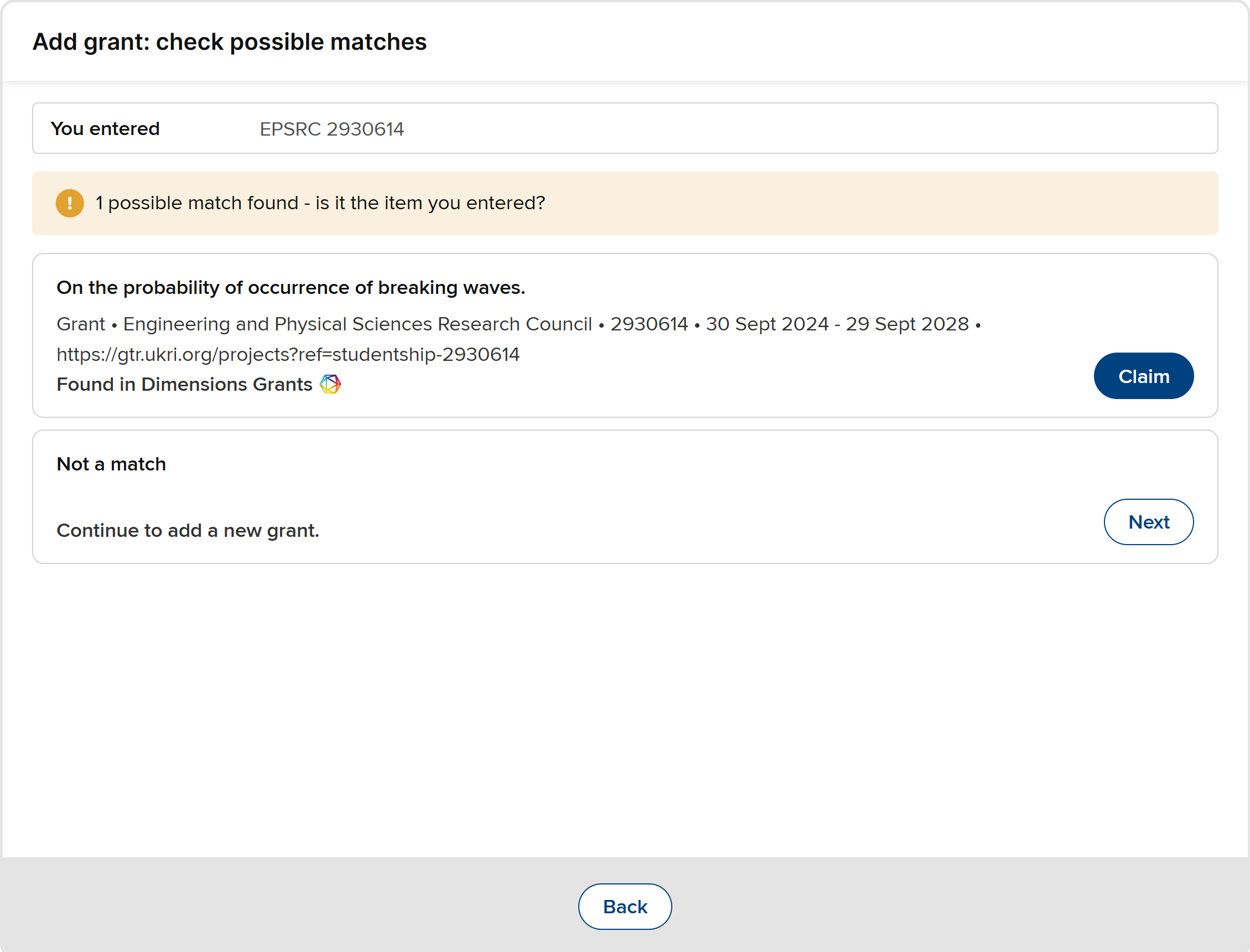
Image: Finding a grant's data in Dimensions from the funder name and grant reference number
The matching strategies for each data category are described in more detail in this support article.
Feature access management
In Elements v7.3, we've added the option to grant access to AI assisted data entry only to selected groups and/or users. This new group- and user-level control will work in conjunction with the existing admin settings that enable or disable the feature globally and per-data category.
This granular control over who can use AI assisted data entry will be managed via a new "Manage feature access" admin page. This will work in the same way as the familiar admin pages for managing roles and module access.
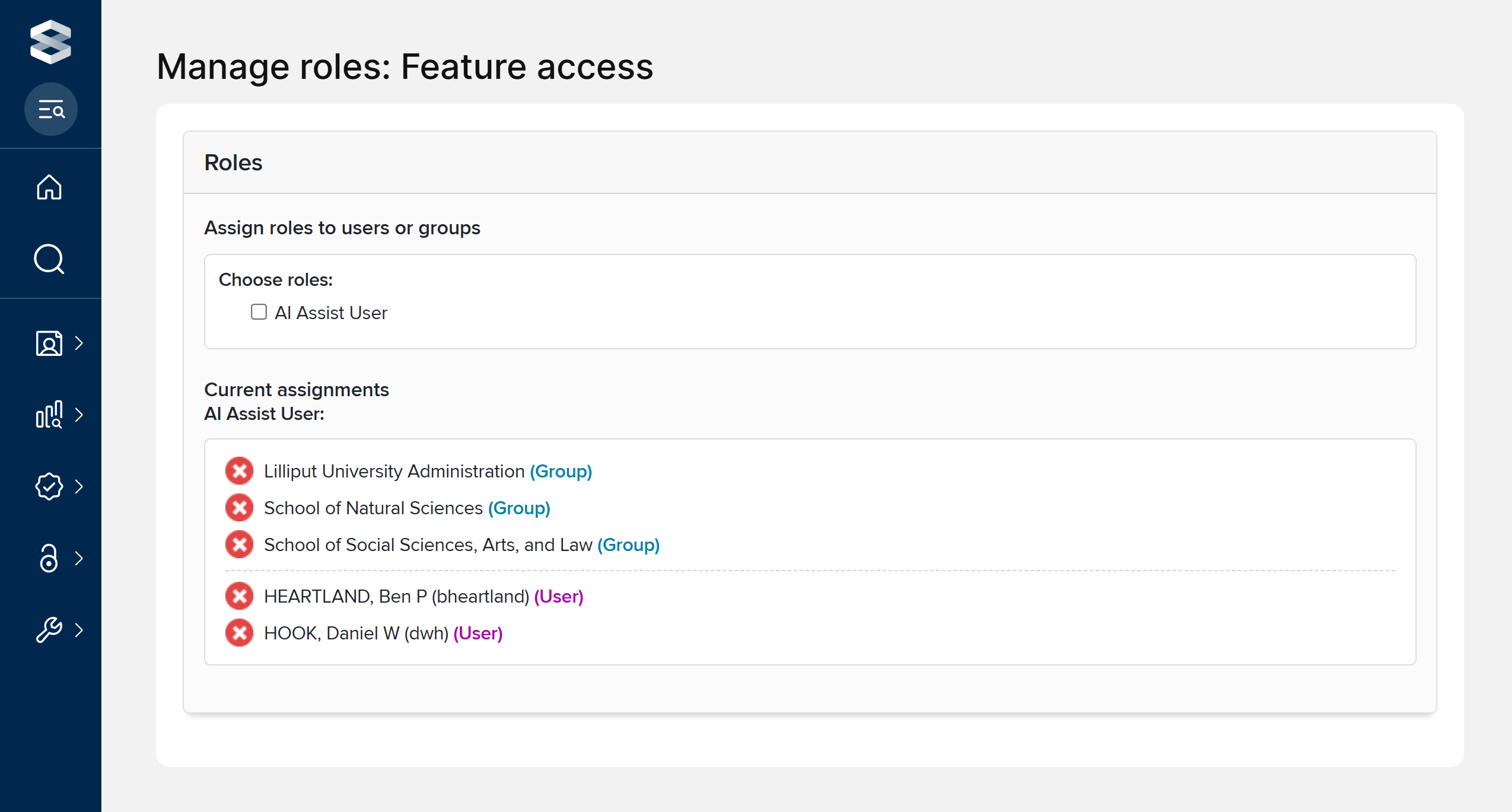
Image: Using feature access management to allow specific groups and users to use AI assisted data entry
Full documentation about configuring and managing AI assisted data entry is available in this support article.
Item Evaluation module expansion
In this release, we have expanded the functionality available in the Item evaluation module to support more scalable and insight-driven review processes. These enhancements introduce comprehensive reporting capabilities, deeper unit-level customisation, and a suite of bulk management tools designed to reduce manual processes and provide real-time clarity on exercise progress.
Integrated reporting and analytics
Item evaluation content is now available in the reporting database, and reports can be generated in the Reporting Hub.
Additionally, this release includes three new stock data extracts in the Reporting Hub:
Item evaluation: Exercise unit summary
Provides a summary of item counts for each unit within the selected Item evaluation exercise, broken down by their status.
Item evaluation: Evaluation item summary
Lists items within the selected Item evaluation exercise unit, including unit and nomination details, current item status, and a summary of review metrics and assigned reviewers.
Item evaluation: Evaluation item review summary
Lists individual reviews for items within the selected exercise unit, including nomination and overall item status, alongside specific details for each assigned reviewer and their current review progress.
Viewing item evaluation content in the Reporting Hub is restricted to the following user roles:
System Administrator
Research Information Administrator
Unit manager (only content in the unit(s) where they have been named as a manager)
Reporting Hub Administrator
Reporting Hub Super-Viewer
Further information on reporting in the Item evaluation module is available in this support article.
Real-time evaluation insights
We have updated the various list pages in the Item evaluation module to include on-screen insights, giving users the ability to view a summary of the exercise at a single glance and easily identify where action is required.
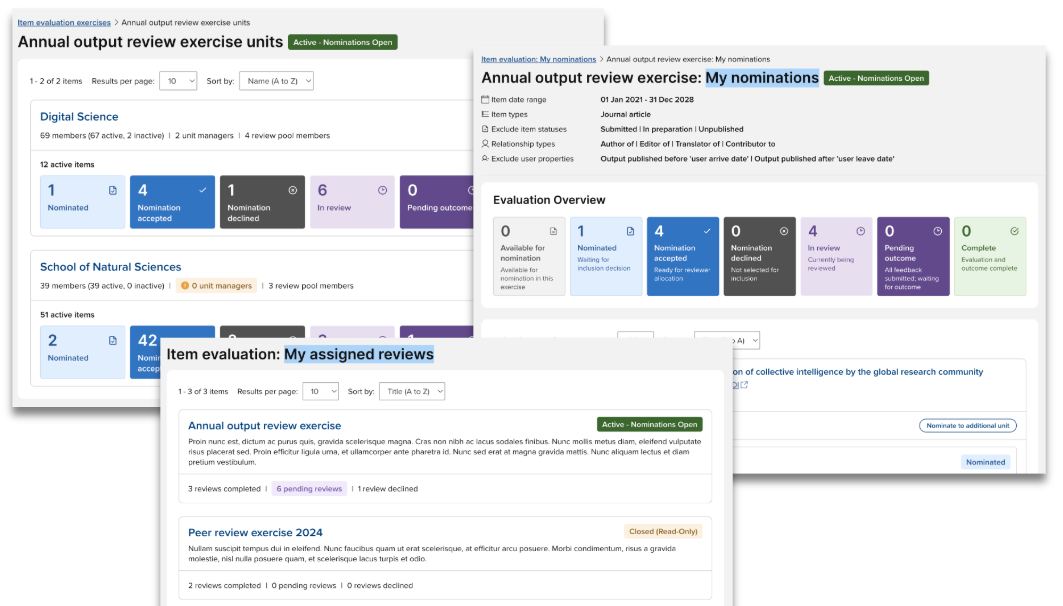
Image: On-screen insights in the Item evaluation module
High-volume management tools
To help teams manage evaluation activity at scale, we have introduced a number of new tools to bypass manual bottlenecks.
Nominate without impersonation
We have updated the Unit management page to include a new ‘Available for nomination’ tab where eligible but not yet nominated items are listed. From this tab, Administrators and Unit managers can now nominate an item to a Unit without needing to impersonate a linked user.
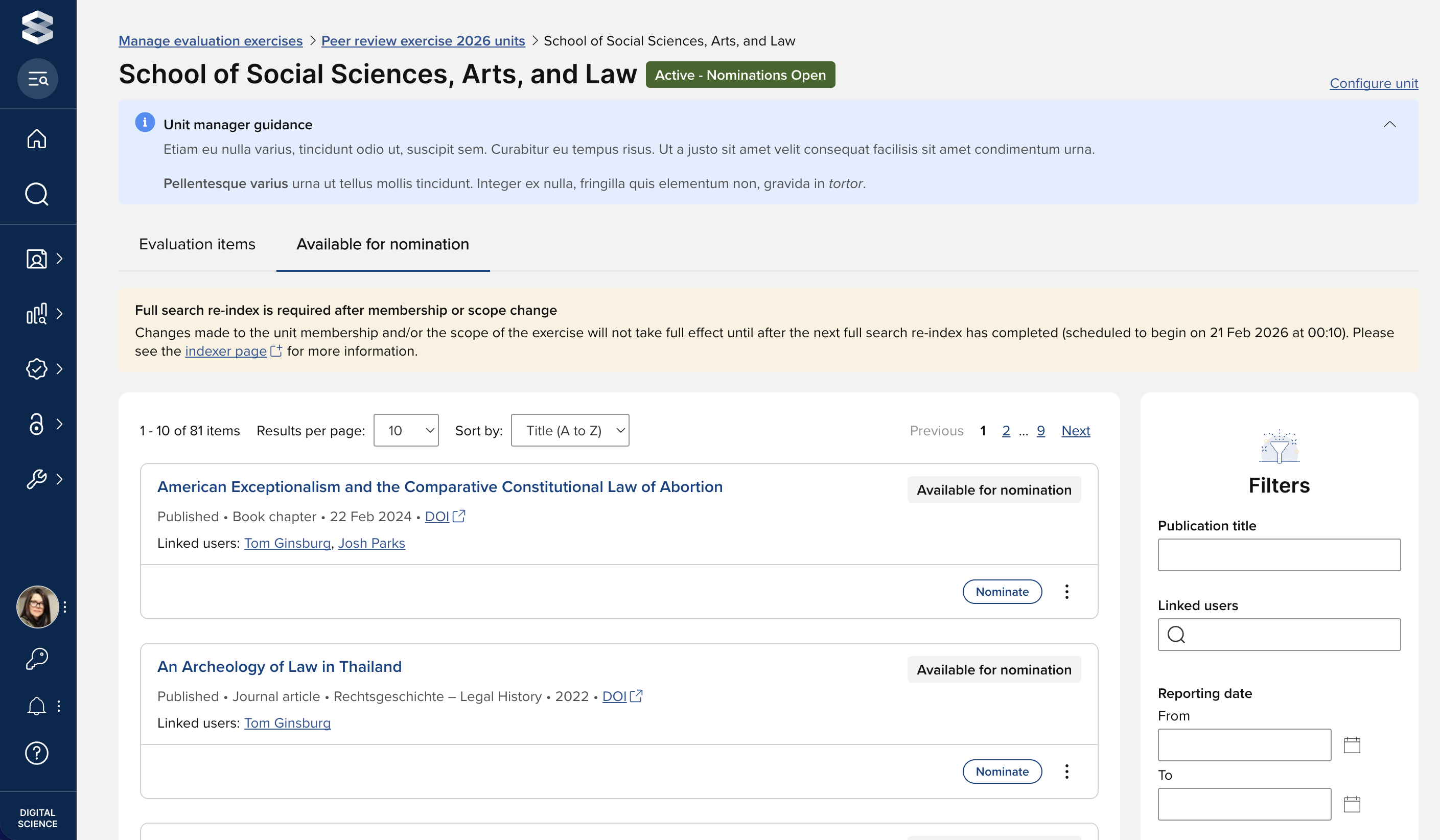
Image: ‘Available for nomination’ tab enabling Unit managers to directly nominate items for evaluation
If the exercise does not include a nomination form, this tab also includes the following bulk actions:
Nominate
Moves all selected items to the ‘Nominated’ status
Nominate & accept
Moves all selected items to the ‘Nomination accepted’ status
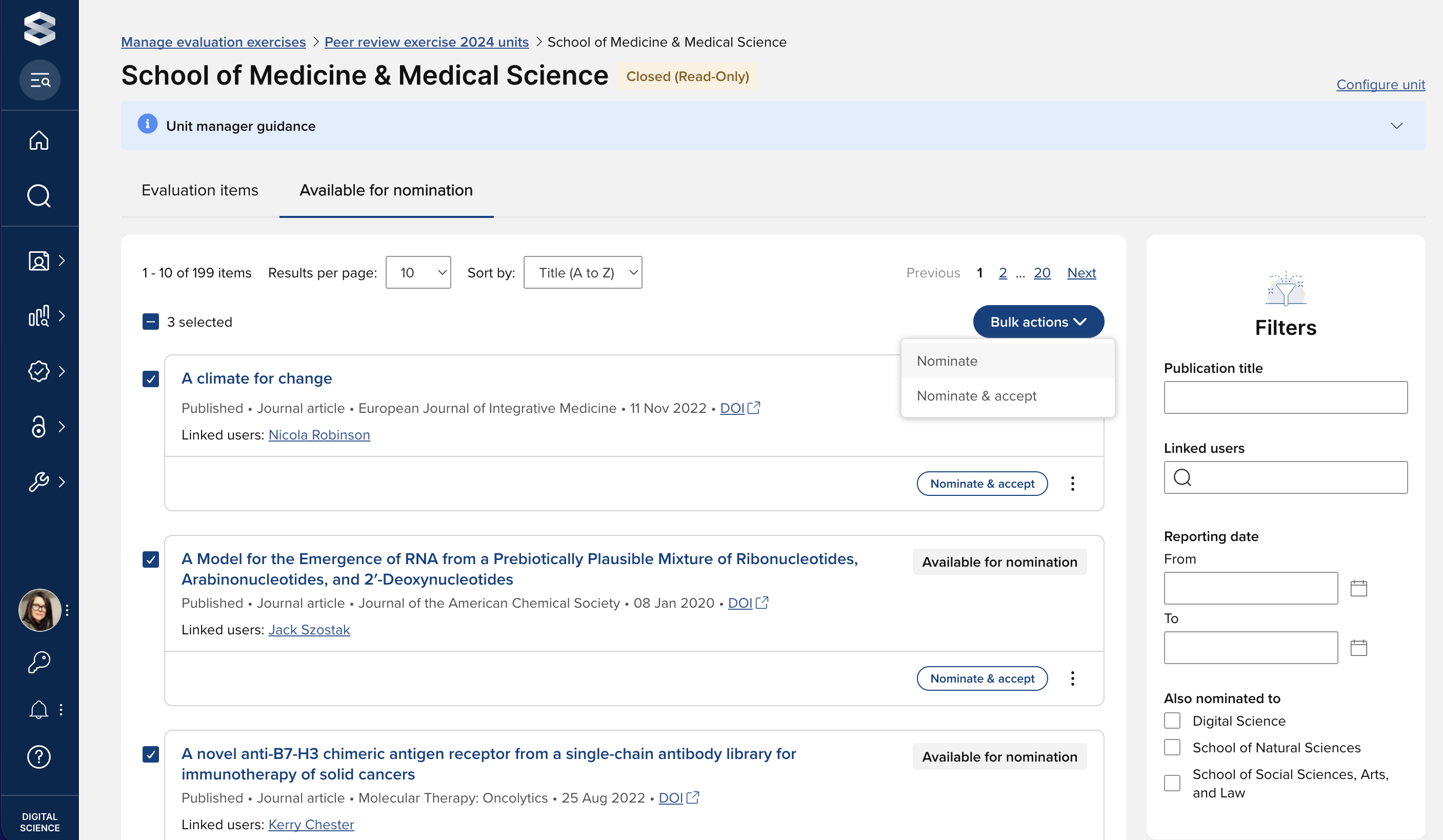
Image: Bulk nomination of eligible items
Nominate to additional units
Administrators and Unit managers can now also nominate an item to any other Unit via the ‘Nominate to additional unit’ action. This action can be performed on both the ‘Available for nomination’ and ‘Evaluation items’ tabs.
Bulk assignment and dispatch of reviews
Two new bulk actions have been introduced in this release that help accelerate the review process.
Assign reviewers
Available for items in Nomination accepted, In review, or Pending outcome status, the ‘Assign reviewers’ action allows you to select reviewers and either assign them or ‘assign and dispatch’ in a single step.
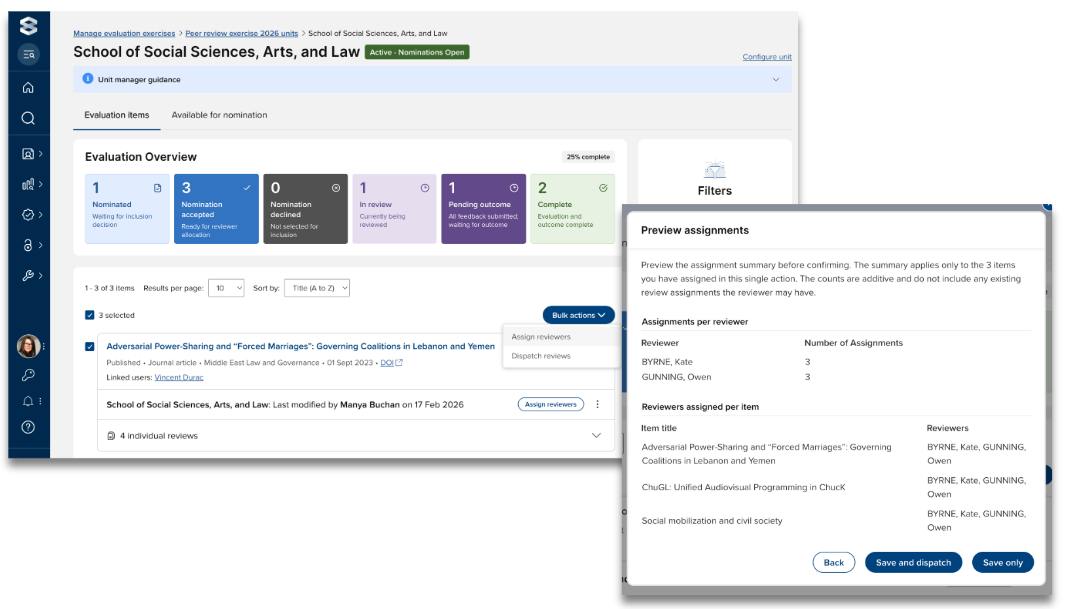
Image: Assign reviewers in bulk
Dispatch reviews
Available for items with at least one review in Assigned status, the ‘Dispatch reviews’ action batches the dispatch of all reviews, moving them instantly from Assigned to Pending review.
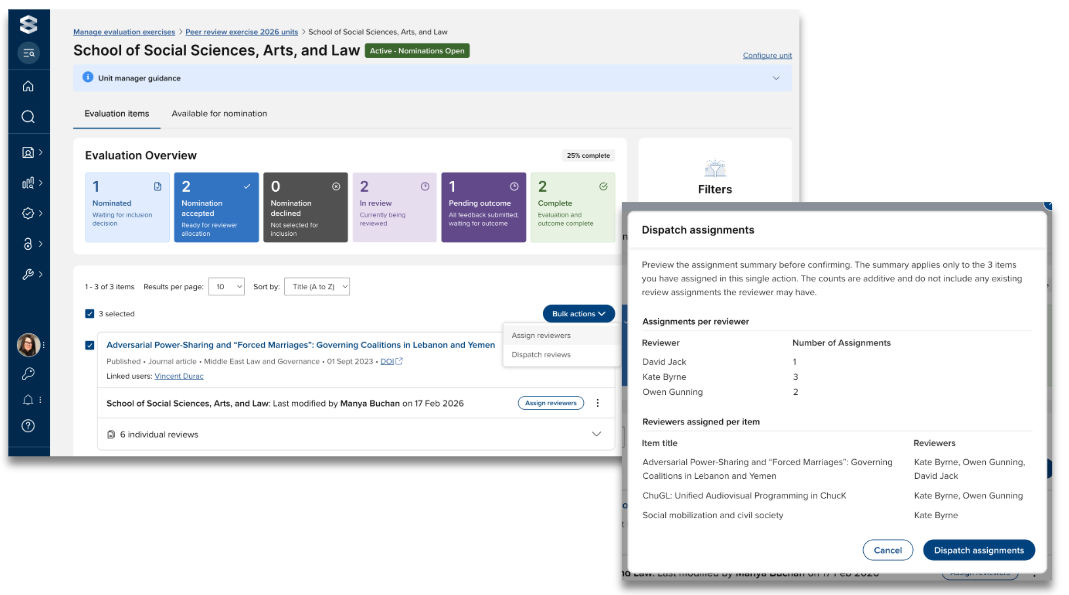
Image: Dispatch reviews in bulk
Reopen evaluation
Administrators and Unit managers can now reopen a completed evaluation to revert its status to ‘Pending outcome.’ This flexibility allows you to assign and dispatch additional reviews for an item after the initial evaluation cycle has been completed. Further details are available in this support article.
Expanded filtering options
In this release, the filters available when managing a Unit’s exercise have been expanded to provide more granular control over item evaluation lists, helping you navigate large datasets with greater precision.
Full details on managing items in an evaluation exercise are available in this support article.
Unit-level configuration options
Within a single exercise, different Units may wish to ask different questions of their nominators, reviewers, and/or moderators, employ different scoresets for review outcomes, and/or tailor guidance text for their specific participants. In response to these requirements, in this release we have introduced a number of Unit-level configuration options.
Further information on configuring unit-level variations is available in this support article.
Key outcome highlighting
As each form (nomination, review, outcome) in the Item evaluation module enables any number of scores to be captured, we have introduced the ability to identify a ‘highlighted score’ per form. Highlighted scores are more prominently displayed on key screens, making outcomes easier to interpret.
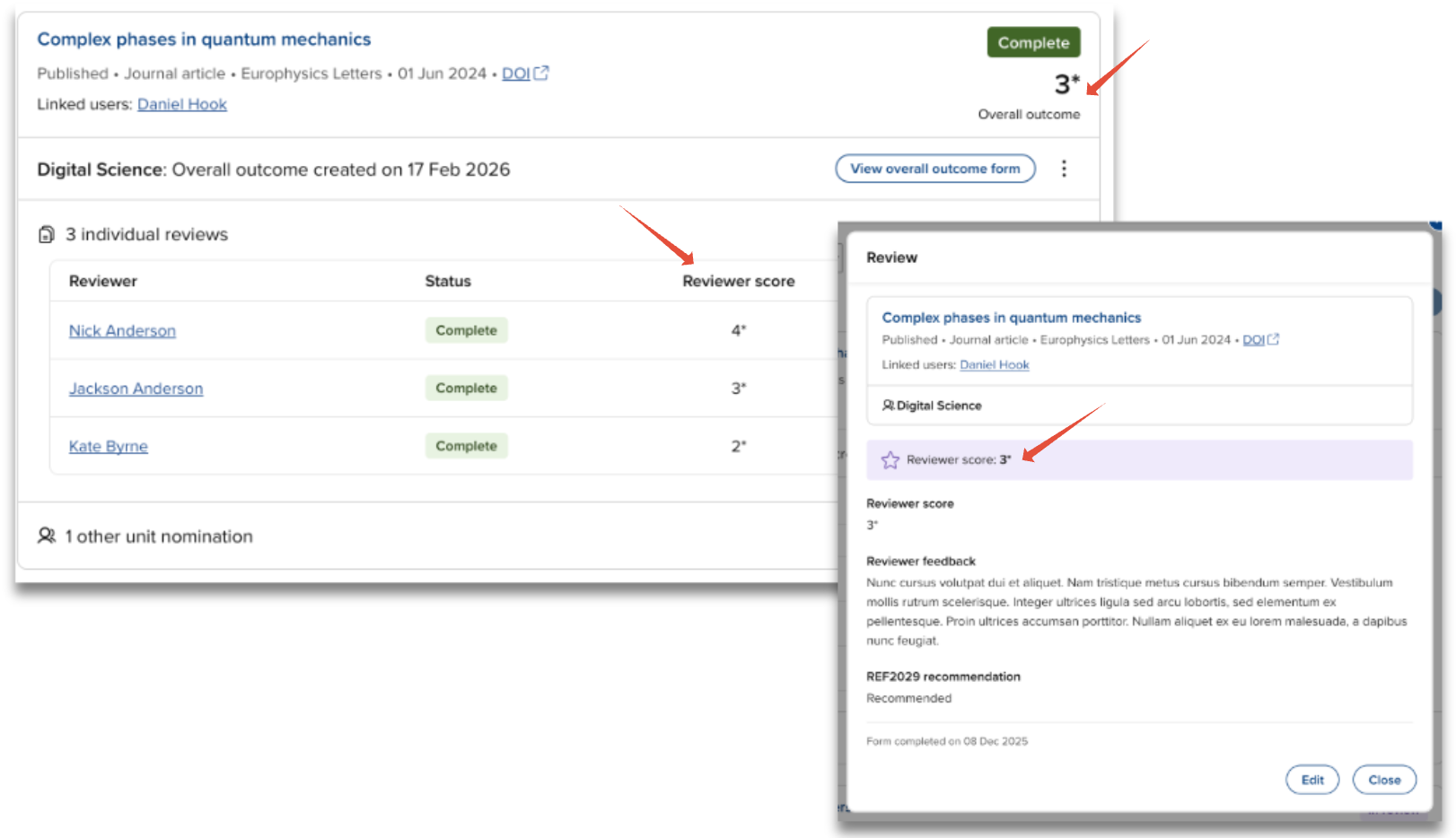
Image: Prominent display of highlighted scores
Further information on highlighted scores is available in this support article.
Improved configuration workflows
In this release, we have expanded the exercise configuration error and warning notifications to administrators, helping you to ensure all expected configuration settings are fully defined and your exercise operates as expected.
Further details on exercise configuration errors and warning notifications are available in the ‘Status’ section at the bottom of the ‘Create and configure an item evaluation exercise’ support article.
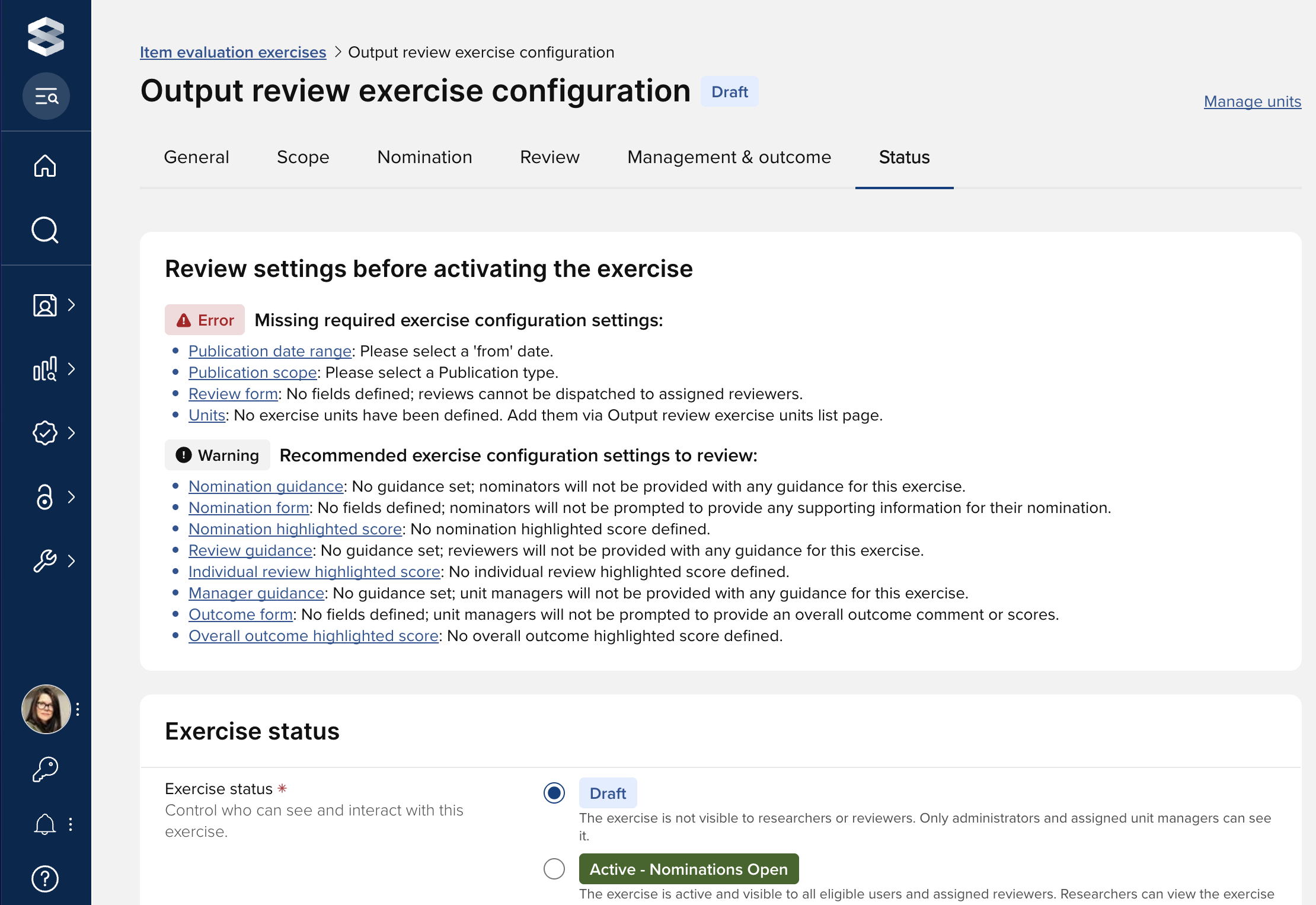
Image: Expanded exercise configuration warning and error notifications
We have also improved the form configuration process, surfacing it directly within the main configuration tabs to provide a more intuitive and seamless setup experience. This update also introduces a modernised design, making it easier to build and manage your forms.
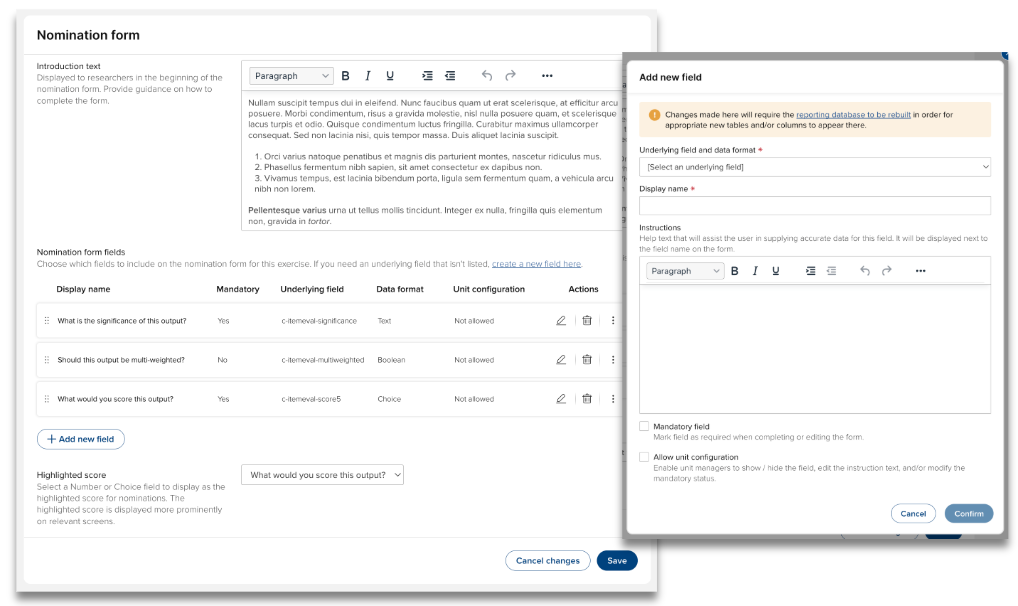
Image: Intuitive form configuration process
Audit trails and history visibility
In order to make decisions and modifications easier to track over time, in this release we have introduced the facility to track history events. History events are available on the following entities and are available in the 3-dot ‘actions’ menu for each:
Exercise configuration
Unit configuration
Items
Individual reviews
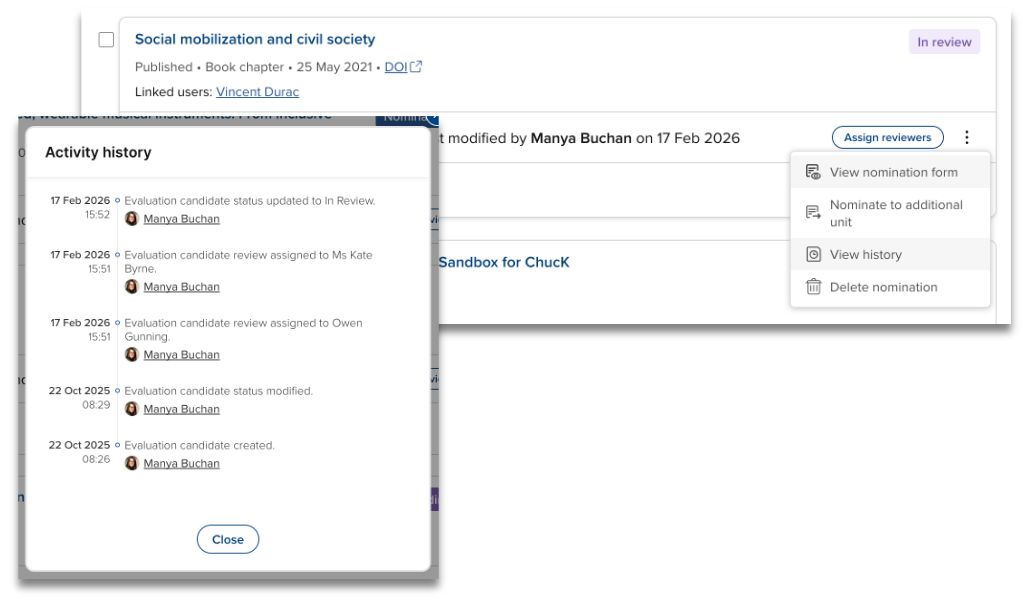
Image: Evaluation item activity history log
Support site
The Item Evaluation section of our support site, where all Item Evaluation support articles can be accessed, has been expanded to include further information on the functionality included in this release.
Awards Management
In this Symplectic Elements release, we are very pleased to introduce a number of enhancements designed to improve the administrator experience in the Awards Management module, and to streamline core workflows within the proposal lifecycle. This release:
Simplifies the proposal approval process by reducing the total number of steps required,
Expands the group type restriction options introduced in v7.2 to now include Managing Groups, and
Introduces a broader range of funding types to improve data categorisation.
As with previous releases, full details of the Awards Management functionality released in v7.3 are available in the Awards Management release notes on our support site.
Assessment module enhancements
The Assessment module enhancements in this release prioritise workflow efficiency and historical data visibility. By expanding scope criteria and introducing cross-exercise linking, we are making it easier for users to manage complex assessment cycles and maintain data consistency over time.
Expanded scope criteria
In this release, we have expanded the scope criteria available for assessment exercises to include publication status, and introduce publication status as a filter on the item selection page.
Enhanced download availability
Users can now generate a download of their exercise from more touchpoints, making it easier to capture and distribute content without navigating away from their current workflow.
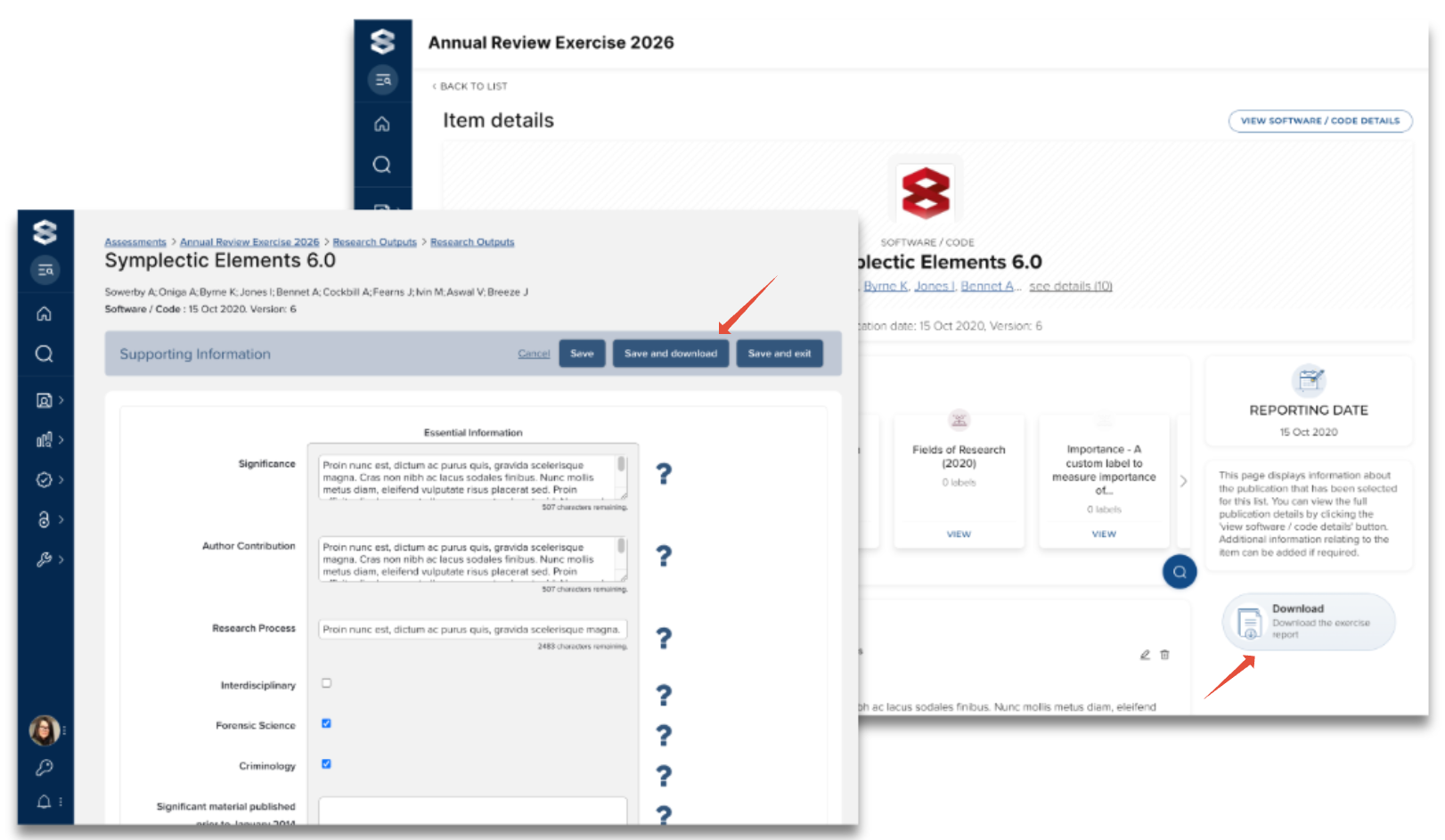
Image: Ability to download the exercise now available on the Item details and Supporting information form pages
Integrated exercise linking
In order for users to more easily view what was captured in a previous exercise (e.g. last year’s FAR), we have introduced the facility to ‘associate’ a previous exercise to the existing one, giving users a quick navigation link on the exercise that opens the ‘previous’ exercise in another tab.
This function is only available for single-response exercises. Users must be able to view the associated exercise as normal for the link to be shown.
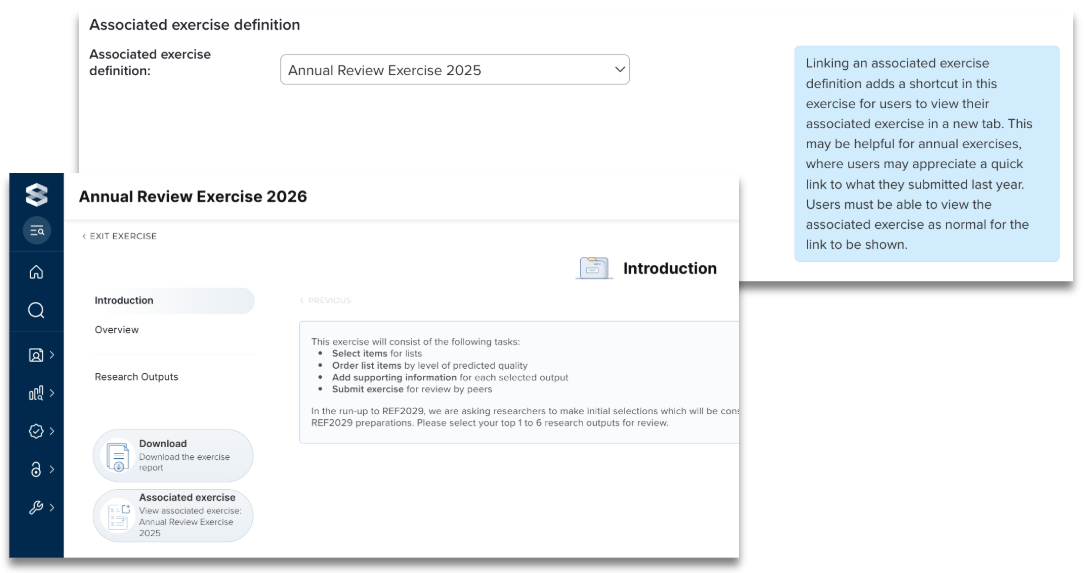
Image: Defining an associated exercise provides a quick navigation link for users
Navigation Sidebar Enhancements
Based on community feedback, we are introducing several refinements to the navigation sidebar to make the platform more intuitive and the search experience more powerful.
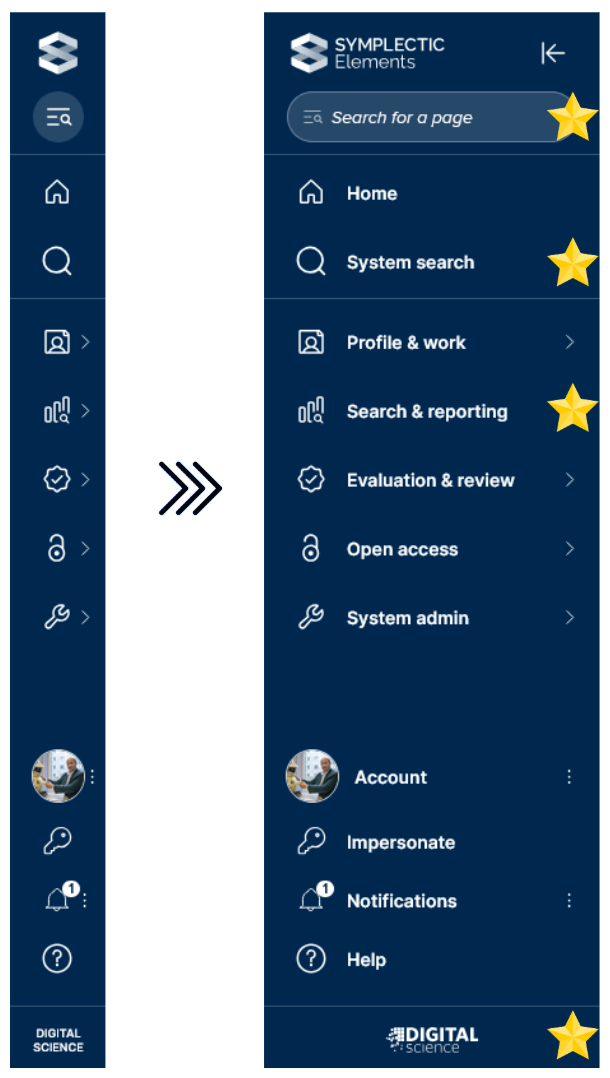
Image: The updated Elements sidebar in both a collapsed and expanded state, with star icons indicating the location of changes
Improved Search Experience
System Search Prominence: We have moved System Search to the top navigation layer for faster access.
Search Icons: We’ve refreshed the associated icons to more clearly represent their functions.
Smarter "Page Search" Logic: We’ve overhauled the backend logic for Page Search. The system now prioritizes exact matches, delivering more relevant and intuitive results as you type.
Dynamic Heading Update: The "System Search" heading now adapts to your specific configuration. If "System Search" is disabled for non admin users in your instance, the "Search & Reporting" heading will automatically simplify to "Reporting” where appropriate.
UI and Branding Refinements
Refreshed Sidebar Footer: To align with the broader Digital Science ecosystem, the footer now expands to display the Digital Science logo rather than plain text.
Improved Link Interactions: We’ve polished the "Open in New Tab" icons to ensure they remain clear and functional even when sidebar text wraps to a second line.
SSO enabled workflow enhancement: Direct login access page
To provide greater flexibility for system administrators and support staff, we’ve introduced a dedicated "Direct Login" page. This can be enabled for clients using SSO workflows, and allows users with local credentials to authenticate directly - an essential tool for support staff and to maintain access during IdP maintenance or troubleshooting.
What’s new?
Direct Access URL: A new, unlinked login page is now available, which can only be accessed by appending /non-sso-login.html to your portal URL (e.g., portalname.symplectic.org/non-sso-login.html).
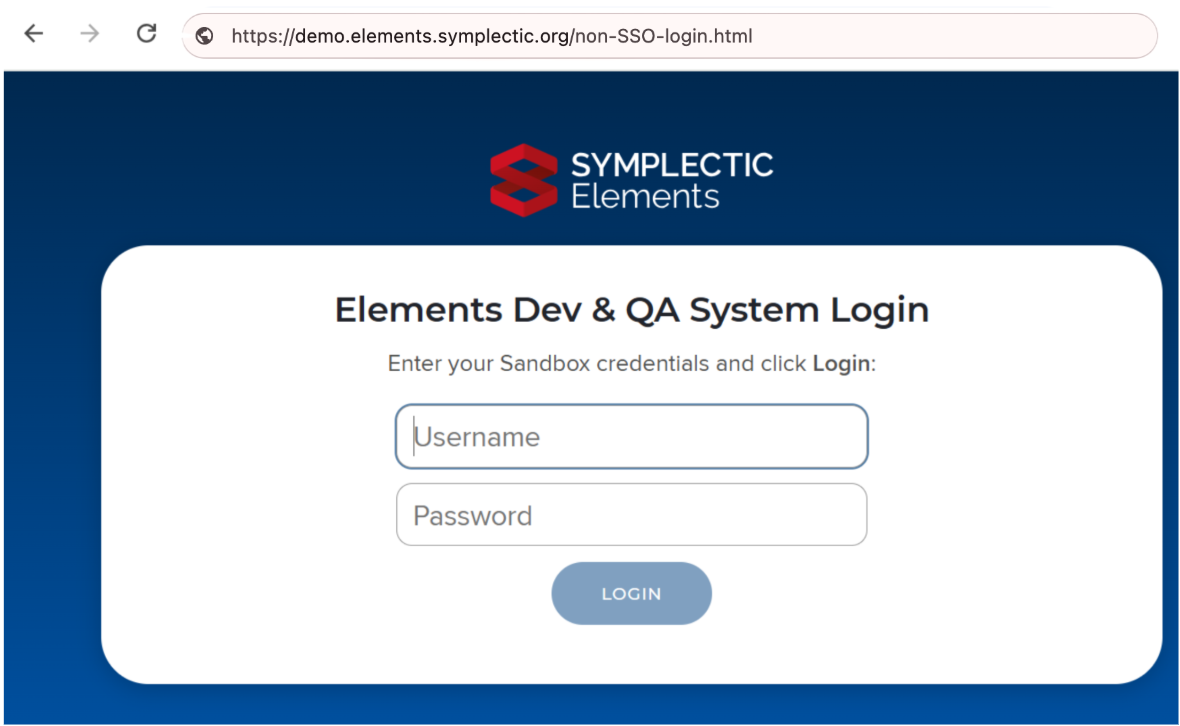
Image: The direct login screen
Configuration Toggle: Admins can now enable or disable this direct login page via a new setting in the Global Settings menu.
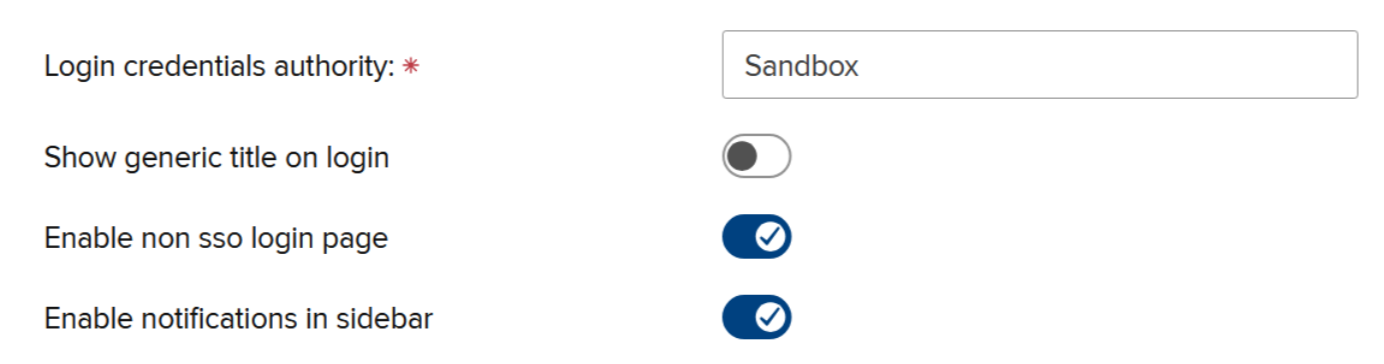
Image: Direct login configuration toggle in the Global Settings page
Simplified SSO authentication failure workflow: To reduce user confusion, the standard SSO login screen will no longer display a login form for "internal login" if an SSO authentication attempt fails.
What isn’t changing?
The standard SSO experience: users who log in via SSO will see no change to their daily workflow, except for no longer being routed to a direct login option when the SSO authentication path fails.
Account management: Existing local credentials and access controls remain exactly as they were in v7.2. We have not modified how you grant or manage internal account permissions.
Configuration and setup
By default: The direct login page is disabled. If you do not enable the toggle, the new login URL will not be made available.
If enabled: The /non-sso-login.html path becomes active, allowing users with specific "internal" credentials to log in independently of your SSO provider.
Key takeaway for Admins
This update separates the SSO flow from the Direct Login flow. It ensures that standard users aren't confused by internal login options, while giving admins a reliable, "hidden" entrance to the system when needed.
Other improvements and fixes
Expanded the range of Grant Types available within Elements ‘out-of-the-box’ to include 3 new types (Mid career fellowship, Research fellowship, and Translational research). To give you the flexibility to decide which, if any, of these new stock types you wish to make available to your users, these additional grant types are disabled upon upgrade (not visible to any users).
Fixed an issue where pending contributors were incorrectly hyperlinked on object list pages, ensuring that only users with approved or claimed links are hyperlinked in metadata sections and record views.
Added support for labels on External Organisations. Label schemes can now be enabled for the External Organisations category; labels in the enabled schemes can be added or removed directly on External Organisation objects.
Improved the Synchroniser to gracefully handle invalid External organisation coordinate values by nulling out faulty longitude and latitude data rather than causing a processing error.
Fixed an issue where external hyperlinks to CrossRef items did not resolve correctly.
Improved the date parser to support partial-precision date ranges (e.g. "FEB-MAR 2023"), ensuring publication dates from sources like Web of Science are correctly captured.
Fixed an issue where the cookie settings page failed to persist the user's selection, ensuring the toggle correctly reflects their stored accept/reject preferences upon reloading.
Fixed a server error in the API by ensuring that record IDs containing special characters (such as "ā") are correctly handled.
Fixed minor UI issues in the Discovery module, resolving a bug where URLs were duplicated during page load and ensuring the correct number of professional positions render on desktop.
End of support
As always, we recommend you regularly review our End of Support Announcements for information about upcoming end of support in Symplectic Elements for various technologies.
We would also like to draw your attention to the upcoming end-of-support dates for versions of Symplectic Elements:
Version | Release date | End of support date |
7.3 | 26 February 2026 | 26 February 2028 |
7.2 | 1 December 2025 | 1 December 2027 |
7.1 | 18 September 2025 | 18 September 2027 |
7.0 | 26 June 2025 | 26 June 2027 |
6.23 | 24 April 2025 | 24 April 2027 |
6.22 | 28 February 2025 | 28 February 2027 |
6.21 | 28 November 2024 | 28 November 2026 |
6.20 | 19 September 2024 | 19 September 2026 |
6.19 | 27 June 2024 | 27 June 2026 |
6.18 | 25 April 2024 | 25 April 2026 |
6.17 | 29 February 2024 | 28 February 2026 |
If you need assistance planning to upgrade, please contact our team via the Support Site.
We’re here to help!
We hope you enjoy getting to know the latest version of Symplectic Elements. Should you have any questions, we’re here to help! Just contact us at support@symplectic.co.uk for assistance.
Best wishes,
The Symplectic Team